Generate Video from Text
with 11 advanced AI models
Write your video description in Persian or any other language. DeepFA AI generates a professional video in minutes using 11 advanced models — no camera, software or technical skills needed.
Create video from text with DeepFA AI
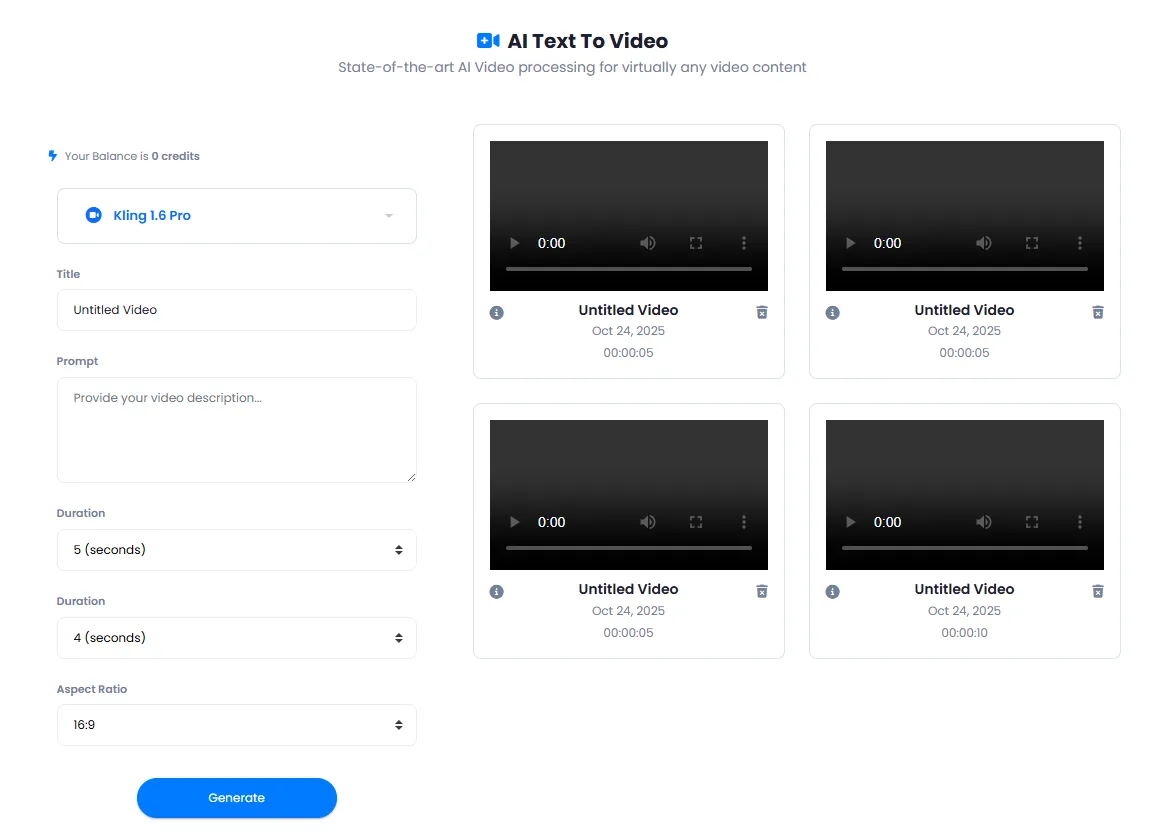
DeepFA's AI Text to Video tool is a complete and professional solution for generating videos without cameras, filming equipment, video editing software or technical skills. Simply write your video description, choose from 11 AI models, set your duration and aspect ratio, and hit generate. AI builds your video in minutes.
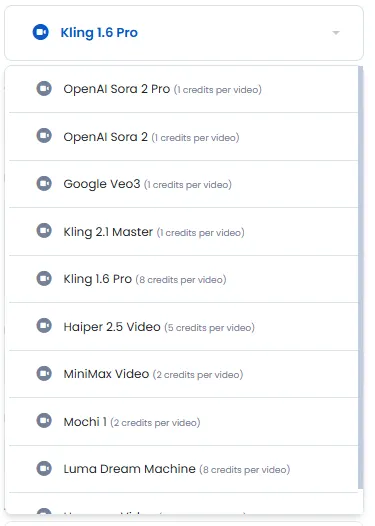
This tool offers diverse models from world-leading tech companies. Sora by OpenAI, Veo by Google, Kling, Hunyuan, MiniMax, Mochi, Haiper and Luma Dream Machine — each with different features, speed and quality. Base models like Sora and Veo cost one credit, while advanced models like Kling Pro and Luma Dream Machine cost up to eight credits.
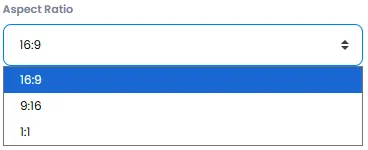
Videos can be generated in 4, 5, 8, 10 and 12 second durations, with three supported aspect ratios: landscape (16:9) for YouTube and web, portrait (9:16) for stories and reels, and square (1:1) for social media posts. This versatility makes DeepFA's text to video tool suitable for all platforms and use cases.
From marketers needing quick ad videos to online teachers creating visual educational content, and from social media content creators to business owners — everyone can benefit from this tool. All generated videos are saved to your account and can be viewed or downloaded at any time.
Advanced models for generating video from text
From economical and fast models to professional ones with the highest quality — suited to your needs and budget
Why generate video from text with AI?
The fastest and easiest way to produce professional videos without any technical expertise
Direct Text to Video Conversion
Write your desired video description and AI converts it to a high-quality video — no editing software needed.
Eleven Diverse AI Models
From economical to advanced models, choose the best option for your project and budget.
Adjustable Duration
Generate 4 to 12 second videos and adjust duration to match your target platform.
Custom Aspect Ratio
Landscape for YouTube, portrait for stories, and square for social media posts — all supported.
Video Generation in Minutes
From submitting your description to receiving the final video, only a few minutes are needed. Faster than any traditional method.
Flexible Cost Structure
From 1 credit for base models to 8 credits for advanced models — suited to any budget.
Create video from text in seven simple steps
From writing your description to receiving the video — a simple and fast process
Go to the Text to Video section
Access the text to video page through the AI Video tools menu.
Check your credit balance
You need credits to generate videos. Different models have different costs.
Select your preferred AI model
Choose from 11 advanced models based on your expected quality and budget.
Enter a title for your video
This field is optional. If left empty, a default title of "Untitled Video" will be assigned.
Write a detailed video description
Required field — the more detailed and complete your description, the higher the quality of the generated video.
Set duration and aspect ratio
Choose from durations of 4 to 12 seconds and three different aspect ratios.
Click the generate video button
The video is generated by AI and saved to your video list.
Who benefits from creating video from text?
From marketers and educators to business owners and content creators
Marketers and Advertisers
Create ad and product intro videos without a production team or filming equipment
Educators and Course Creators
Generate educational and explainer videos from lesson scripts or presentations
Social Media Content Creators
Create engaging short videos for Instagram, TikTok and YouTube
Business Owners
Quickly produce service, product and brand introduction videos
Media and News Agencies
Automatically generate visual news clips from report text
A look inside the text to video tool
Simple, user-friendly interface — click any image to enlarge.
What is AI Text to Video and what is it used for?
From choosing the right model to setting duration and aspect ratio — everything you need to know about generating videos from text with 11 advanced models.
AI text to video is a completely new method for generating video content without cameras, filming equipment, complex software or technical skills. On DeepFA, eleven powerful models from leading companies like OpenAI, Google and Lumalab are available, each with different quality, speed and cost. The key difference from traditional methods is the elimination of all intermediate steps: no need to write scripts, shoot, edit or do voiceover — just describe, and the AI builds the video.
Managing costs and choosing the right model are among the most important aspects of using this tool. Base models like Sora, Veo and Kling Master cost only 1 credit and are ideal for fast, cost-effective ideation. Mid‑range models like MiniMax and Mochi cost 2 credits and offer a good balance between quality and price. Professional models like Kling Pro and Luma Dream Machine cost 8 credits and deliver the highest quality and detail for sensitive projects. This variety lets you choose the best option for your budget and needs.
11 diverse models — from economical to professional
Base models (Sora, Veo, Kling Master) cost 1 credit for fast, cheap generation. Mid‑range models (MiniMax, Mochi) cost 2 credits for quality/price balance. Professional models (Kling Pro, Luma Dream Machine) cost 8 credits for highest quality. Your choice.
Adjustable duration — from 4 to 12 seconds
Five duration options: 4, 5, 8, 10 and 12 seconds. Short durations for teasers and quick ads, longer for explainer videos and product intros. Every project has its ideal length.
Custom aspect ratio — perfect for all platforms
16:9 landscape for YouTube and websites, 9:16 portrait for Instagram stories and TikTok reels, 1:1 square for social media feed posts. One video, multiple ratios.
Transparent cost structure — from 1 to 8 credits
Base models: 1 credit. Mid‑range models: 2 credits. Professional models: 8 credits. No hidden fees. Credits are usable across all DeepFA tools.
Generated in minutes — faster than any traditional method
From writing the description to receiving the final video typically takes 2 to 5 minutes. In contrast, producing a similar video traditionally takes hours or days.
Suitable for any video type — ads, educational, social content
Product ads, brand intro videos, educational content, event teasers, social media videos, short animations — whatever you need, created with a simple description.
Choosing the best model depends on your needs. If you want to quickly test different ideas with low cost, 1‑credit models are a smart choice. If you have a semi‑professional project and need good quality without high expense, 2‑credit models like MiniMax and Mochi are suitable. If the video is for a major ad campaign, a flagship product intro or a sensitive client presentation, invest in 8‑credit models. You can also test one description with several different models and pick the best output — credits are only charged for outputs you save.
Other AI video tools on DeepFA
A complete suite of AI video tools for creating, editing and enhancing videos
Answers to your questions about AI text to video
Everything you need to know about creating video from text
Generate your first AI video from text right now
Sign up in seconds and generate your first video for free