The DeepFA AI API,
OpenAI-compatible
GPT, Claude, Gemini, Grok and DeepSeek behind one address and one key. Because the API is exactly the OpenAI standard, the libraries and tools you already have — the official Python and JavaScript clients, VS Code extensions, Cursor — connect to DeepFA by changing one base URL, and run on rial credit.
Change one URL and it works everywhere
OpenAI-compatible means the request and response shape of our API is exactly the OpenAI standard — not that we only serve OpenAI models. So anything built for OpenAI — your own code, a server, a mobile app, an automation, the VS Code extensions, Cursor — connects by changing one base URL and runs GPT, Claude, Gemini, Grok and DeepSeek on a rial-denominated balance.
curl https://deepfa.ir/api/v1/chat/completions \
  -H "Authorization: Bearer $DEEPFA_API_KEY" \
  -H "Content-Type: application/json" \
  -d '{
    "model": "gpt-5.4-mini",
    "messages": [{"role": "user", "content": "سلام"}]
  }'
from openai import OpenAI

client = OpenAI(
    api_key="YOUR_DEEPFA_KEY",
    base_url="https://deepfa.ir/api/v1",
)

answer = client.chat.completions.create(
    model="claude-sonnet-5",
    messages=[{"role": "user", "content": "سلام"}],
)

print(answer.choices[0].message.content)
import OpenAI from "openai";

const client = new OpenAI({
  apiKey: "YOUR_DEEPFA_KEY",
  baseURL: "https://deepfa.ir/api/v1",
});

const answer = await client.chat.completions.create({
  model: "gemini-3-flash-preview",
  messages: [{ role: "user", content: "سلام" }],
});
The endpoints
| POST | /chat/completions | Chat, with streaming and tool calling |
| GET | /models | The models your key may call |
| POST | /embeddings | Text to vectors, for search |
| POST | /images/generations | Image generation |
| POST | /audio/transcriptions | Speech to text |
| POST | /audio/speech | Text to speech |
| POST | /agents/runs | Start an agent: research, analysis or a site |
| GET | /agents/runs/{id} | A run: its status and files |
Every endpoint spends the same API credit: chat and embeddings by the tokens they use, images per image, transcription per minute and speech per character. What each call cost is returned in a response header and listed on your usage page.
The agents, from your own code
An agent takes a job from end to end: it searches the web, writes and runs code in a sandbox, and hands back an answer with the files it produced - a report, a chart, a spreadsheet or a finished web page. All three agents of the panel run from your own code with the same key.
One POST to /agents/runs with the agent and its input; you get a run id.
GET /agents/runs/{id} every few seconds; the status moves from processing to completed.
The answer and a list of files; each one has a URL you download with the same key.
curl https://deepfa.ir/api/v1/agents/runs \
  -H "Authorization: Bearer $DEEPFA_API_KEY" \
  -H "Content-Type: application/json" \
  -d '{"agent":"research","input":{"topic":"...","depth":"standard","language":"fa"}}'
A run is charged when it finishes, from your API credit: the model it used, each web search and the sandbox session. A run that fails, is cancelled or produces nothing is not charged.
What each model costs
Per million tokens. The same work can cost twenty times more on one model than another, so it is worth reading before you choose one.
| Model | Input | Output | 1M in + 1M out |
|---|---|---|---|
| text-embedding-3-small openai | 60 | 0 | 0.0384 USD |
| text-embedding-3-large openai | 390 | 0 | 0.25 USD |
| gpt-4.1-nano openai | 300 | 1,200 | 0.96 USD |
| gpt-4o-mini openai | 450 | 1,800 | 1.44 USD |
| gpt-4o-mini-search-preview openai | 450 | 1,800 | 1.44 USD |
| gpt-5.6-luna openai | 600 | 3,600 | 2.69 USD |
| gpt-5.4-nano openai | 600 | 3,750 | 2.78 USD |
| deepseek-chat deepseek | 900 | 3,600 | 2.88 USD |
| deepseek-flash deepseek | 900 | 3,600 | 2.88 USD |
| gemini-3.1-flash-lite google | 750 | 4,500 | 3.36 USD |
| sonar perplexity | 3,000 | 3,000 | 3.84 USD |
| deepseek-reasoner deepseek | 1,650 | 6,600 | 5.28 USD |
| gemini-2.5-flash google | 900 | 7,500 | 5.38 USD |
| gemini-3-flash-preview google | 1,500 | 9,000 | 6.72 USD |
| gpt-5.4-mini openai | 2,250 | 13,500 | 10.08 USD |
| deepseek-v4-pro deepseek | 3,900 | 11,850 | 10.08 USD |
| o4-mini openai | 3,300 | 13,200 | 10.56 USD |
| sonar-reasoning perplexity | 3,000 | 15,000 | 11.52 USD |
| claude-haiku-4-5 anthropic | 3,000 | 15,000 | 11.52 USD |
| gemini-3.7-flash google | 4,500 | 22,500 | 17.28 USD |
| gemini-3.8-flash google | 4,500 | 22,500 | 17.28 USD |
| sonar-reasoning-pro perplexity | 6,000 | 24,000 | 19.20 USD |
| o3 openai | 6,000 | 24,000 | 19.20 USD |
| gemini-2.5-pro google | 3,750 | 30,000 | 21.60 USD |
| claude-sonnet-5 anthropic | 6,000 | 30,000 | 23.04 USD |
| gpt-4o-search-preview openai | 7,500 | 30,000 | 24.00 USD |
| gemini-3-pro-preview google | 6,000 | 36,000 | 26.88 USD |
| gemini-3.1-pro-preview google | 6,000 | 36,000 | 26.88 USD |
| gpt-5.6-terra openai | 6,000 | 36,000 | 26.88 USD |
| gpt-5.2 openai | 5,250 | 42,000 | 30.24 USD |
| gpt-5.3-codex openai | 5,250 | 42,000 | 30.24 USD |
| gpt-5.4 openai | 7,500 | 45,000 | 33.60 USD |
| sonar-pro perplexity | 9,000 | 45,000 | 34.56 USD |
| claude-sonnet-4-6 anthropic | 9,000 | 45,000 | 34.56 USD |
| gpt-5.6-sol openai | 12,000 | 60,000 | 46.08 USD |
| claude-opus-4-7 anthropic | 15,000 | 75,000 | 57.60 USD |
| claude-opus-5 anthropic | 15,000 | 75,000 | 57.60 USD |
| claude-opus-4-8 anthropic | 15,000 | 75,000 | 57.60 USD |
| gpt-5.5 openai | 15,000 | 90,000 | 67.20 USD |
| claude-fable-5-1 anthropic | 30,000 | 150,000 | 115 USD |
| claude-fable-5 anthropic | 30,000 | 150,000 | 115 USD |
| gpt-6-astra openai | 30,000 | 150,000 | 115 USD |
| gpt-5.2-pro openai | 63,000 | 504,000 | 363 USD |
The input and output columns are credits per million tokens. The last column is the same amount in US dollars, priced from the cheapest API pack.
| Model | Unit | Credits | USD |
|---|---|---|---|
| gpt-image-1 Images | per image | 500 | 0.32 |
| gpt-image-2.5-flare Images | per image | 440 | 0.28 |
| gpt-image-2.5-sunburst Images | per image | 440 | 0.28 |
| tts-1 Text to speech | per 1,000 characters | 34 | 0.0218 |
| tts-1-hd Text to speech | per 1,000 characters | 68 | 0.0435 |
| gpt-4o-mini-tts Text to speech | per 1,000 characters | 34 | 0.0218 |
| whisper-1 Transcription | per minute | 15 | 0.0096 |
| gpt-4o-transcribe Transcription | per minute | 15 | 0.0096 |
| gpt-4o-mini-transcribe Transcription | per minute | 7.5 | 0.0048 |
Images, speech and transcription spend the same API credit, and the dollar column is priced from the cheapest API pack.
In your editor
{
  "models": [{
    "title": "DeepFA",
    "provider": "openai",
    "model": "claude-sonnet-5",
    "apiKey": "YOUR_DEEPFA_KEY",
    "apiBase": "https://deepfa.ir/api/v1"
  }]
}
"github.copilot.chat.customOAIModels": [{
  "modelId": "claude-sonnet-5",
  "displayName": "DeepFA Claude Sonnet 5",
  "endpoint": "https://deepfa.ir/api/v1",
  "apiKey": "YOUR_DEEPFA_KEY"
}]
# Settings → Models → OpenAI API

Base URL:  https://deepfa.ir/api/v1
API Key:   YOUR_DEEPFA_KEY
Model:     gpt-5.4  /  claude-sonnet-5
Provider:  OpenAI Compatible

Base URL:  https://deepfa.ir/api/v1
API Key:   YOUR_DEEPFA_KEY
Model ID:  claude-sonnet-5
You create and revoke keys from your own dashboard, and can put a daily and a monthly credit ceiling on each one.
An OpenAI-compatible gateway, for developers and businesses
The DeepFA AI API is a gateway that speaks the OpenAI standard: the same /v1/chat/completions path, the same request body, the same response shape and the same error format. Any library, extension or service that works with OpenAI today connects to DeepFA by changing the base URL and the key — no rewrite, no bespoke SDK, no new contract to learn. Behind that one address sit GPT, Claude, Gemini, Grok and DeepSeek models, and switching between them means changing one string in the model field.
Beyond chat, the same address serves embeddings for semantic search and RAG, image generation, speech-to-text and text-to-speech. SSE streaming, tool calling, structured output and image input are all supported and behave exactly as they do upstream. The cost of every call comes back in a response header and is recorded on the API page of your dashboard, broken down by key and by model — failed requests included, so your credit is never a black hole.
For a developer in Iran the difference that matters most is payment: credit is bought in rial through a local gateway, no international card is needed, and bought credit never expires. Each key can carry a daily and monthly credit ceiling, a per-minute request limit and an allow-list of models, so a key handed to a script or a colleague cannot empty the account — and can be revoked in one click if it leaks.
Why the DeepFA AI API?
Built with developer needs in focus — easy to start, secure to use and scalable for growth.
OpenAI-compatible
The same paths, the same request body, the same response shape. The official OpenAI libraries and anything built on them connect to DeepFA by changing one base URL.
One key, every vendor
GPT, Claude, Gemini, Grok and DeepSeek behind one key and one address. Switching model means changing one string, not changing libraries, accounts and invoices.
Streaming, tools and vision
Token-by-token SSE streaming, tool calling, structured output and image input — none of it needing a change to code you have already written.
A spending ceiling per key
Set a daily and monthly ceiling, a per-minute request limit and an allow-list of models on each key. A key you hand to a script cannot empty the account.
What every call cost
The cost of each request comes back in a response header and is recorded on your usage page by key and by model — failures included. Your credit is not a black hole.
Pay in rial, no foreign card
Buy credit through a local gateway, and bought credit never expires. No international card, nothing to work around.
The endpoints you can call
All under one base URL, all with the same key, all in the request and response shape you know from OpenAI.
Quick Start in 6 Programming Languages
The same request in six languages. The only things that differ from OpenAI are the base URL and the key.
curl https://deepfa.ir/api/v1/chat/completions \
  -H "Authorization: Bearer $DEEPFA_API_KEY" \
  -H "Content-Type: application/json" \
  -d '{
    "model": "claude-sonnet-5",
    "messages": [{"role": "user", "content": "Hello"}]
}'# pip install openai
from openai import OpenAI
client = OpenAI(
api_key="YOUR_DEEPFA_KEY",
base_url="https://deepfa.ir/api/v1",
)
completion = client.chat.completions.create(
model="claude-sonnet-5",
messages=[{"role": "user", "content": "Hello"}],
)
print(completion.choices[0].message.content)
print(completion.usage.total_tokens, "tokens")// Any fetch, no SDK needed.
const res = await fetch('https://deepfa.ir/api/v1/chat/completions', {
method: 'POST',
headers: {
'Authorization': `Bearer ${DEEPFA_API_KEY}`,
'Content-Type': 'application/json'
},
body: JSON.stringify({
model: 'gpt-5.4',
messages: [{ role: 'user', content: 'Hello' }],
stream: false
})
});
const data = await res.json();
console.log(data.choices[0].message.content);
// What the call cost, straight off the response header.
console.log(res.headers.get('x-deepfa-credits'), 'credits');// npm install openai
import OpenAI from 'openai';
const client = new OpenAI({
apiKey: process.env.DEEPFA_API_KEY,
baseURL: 'https://deepfa.ir/api/v1'
});
// Streaming works exactly as it does upstream.
const stream = await client.chat.completions.create({
model: 'gemini-3.8-flash',
messages: [{ role: 'user', content: 'Write a haiku' }],
stream: true
});
for await (const chunk of stream) {
process.stdout.write(chunk.choices[0]?.delta?.content ?? '');
}<?php
$ch = curl_init('https://deepfa.ir/api/v1/chat/completions');
curl_setopt_array($ch, [
CURLOPT_POST => true,
CURLOPT_RETURNTRANSFER => true,
CURLOPT_HTTPHEADER => [
'Authorization: Bearer ' . getenv('DEEPFA_API_KEY'),
'Content-Type: application/json',
],
CURLOPT_POSTFIELDS => json_encode([
'model' => 'deepseek-chat',
'messages' => [['role' => 'user', 'content' => 'Hello']],
]),
]);
$result = json_decode(curl_exec($ch), true);
curl_close($ch);
echo $result['choices'][0]['message']['content'];package main
import (
"bytes"
"encoding/json"
"fmt"
"net/http"
"os"
)
func main() {
body, _ := json.Marshal(map[string]any{
"model": "claude-haiku-4-5",
"messages": []map[string]string{
{"role": "user", "content": "Hello"},
},
})
req, _ := http.NewRequest("POST",
"https://deepfa.ir/api/v1/chat/completions",
bytes.NewBuffer(body))
req.Header.Set("Authorization", "Bearer "+os.Getenv("DEEPFA_API_KEY"))
req.Header.Set("Content-Type", "application/json")
res, _ := http.DefaultClient.Do(req)
defer res.Body.Close()
var out map[string]any
json.NewDecoder(res.Body).Decode(&out)
fmt.Println(out["choices"])
}{
"id": "chatcmpl-9f2c1a",
"object": "chat.completion",
"model": "claude-sonnet-5",
"choices": [{
"index": 0,
"message": { "role": "assistant", "content": "Hello!" },
"finish_reason": "stop"
}],
"usage": {
"prompt_tokens": 12,
"completion_tokens": 306,
"total_tokens": 318
}
}
data: {"id":"chatcmpl-9f2c1a","object":"chat.completion.chunk",
"choices":[{"delta":{"content":"Hel"},"index":0}]}

data: [DONE]
{
  "object": "list",
  "model": "text-embedding-3-small",
  "data": [{ "object": "embedding", "index": 0,
             "embedding": [0.0021, -0.0134, 0.0075] }],
  "usage": { "prompt_tokens": 8, "total_tokens": 8 }
}
{
  "created": 1788115200,
  "data": [{ "url": "https://.../img_x7k2m.png" }]
}
x-deepfa-request-id: 3f9a1c2e-...
x-deepfa-credits: 0.0954
x-deepfa-credit-unit: credits
{
  "error": {
    "message": "You have run out of credit.",
    "type": "insufficient_quota",
    "param": null,
    "code": "insufficient_quota"
  }
}
Send your first request in four simple steps
From creating a key to the first answer in under a minute. No app registration, no OAuth dance.
Create an API key
Sign in, open the API page and create a key. The key is shown once, so copy it there and then.
Point the base URL at DeepFA
In whatever tool or library you already use, set the base URL to https://deepfa.ir/api/v1 and paste the key as the API key.
Choose a model
Put the model name in the same model field — claude-sonnet-5, gpt-5.4, gemini-3.8-flash or any other your key allows.
Watch what it costs
The cost of each call comes back in the x-deepfa-credits header and is recorded on the API page by key and by model.
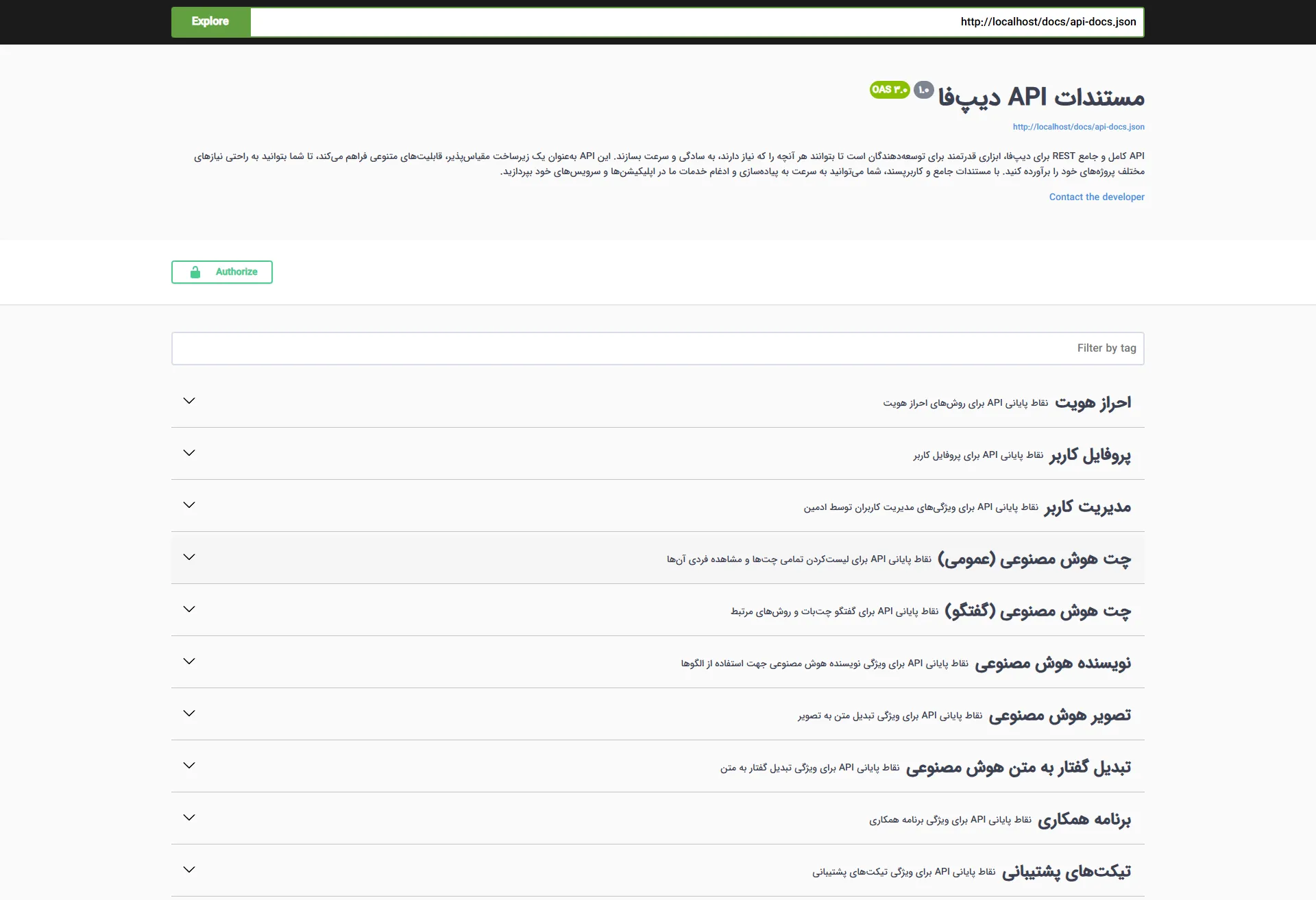
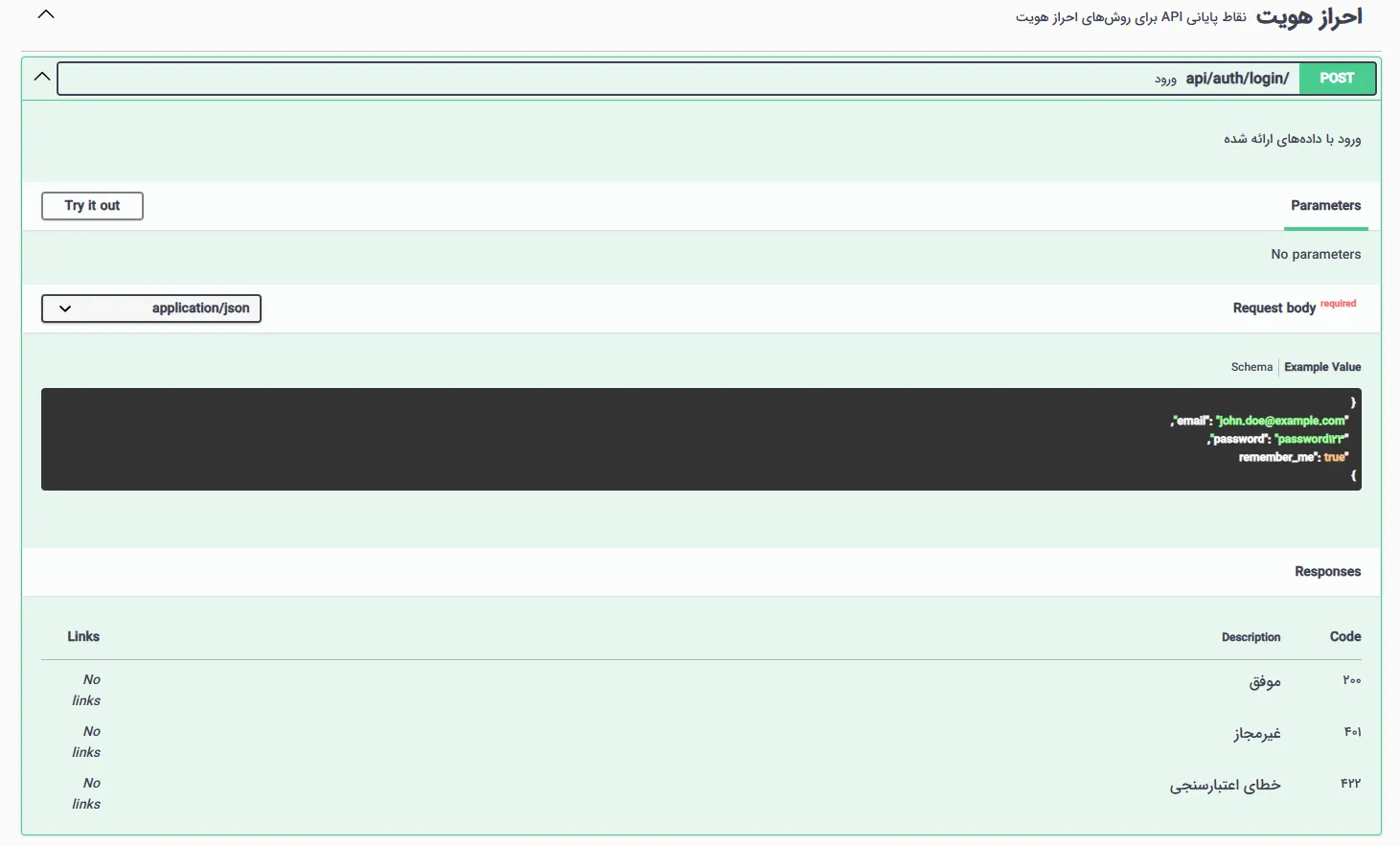
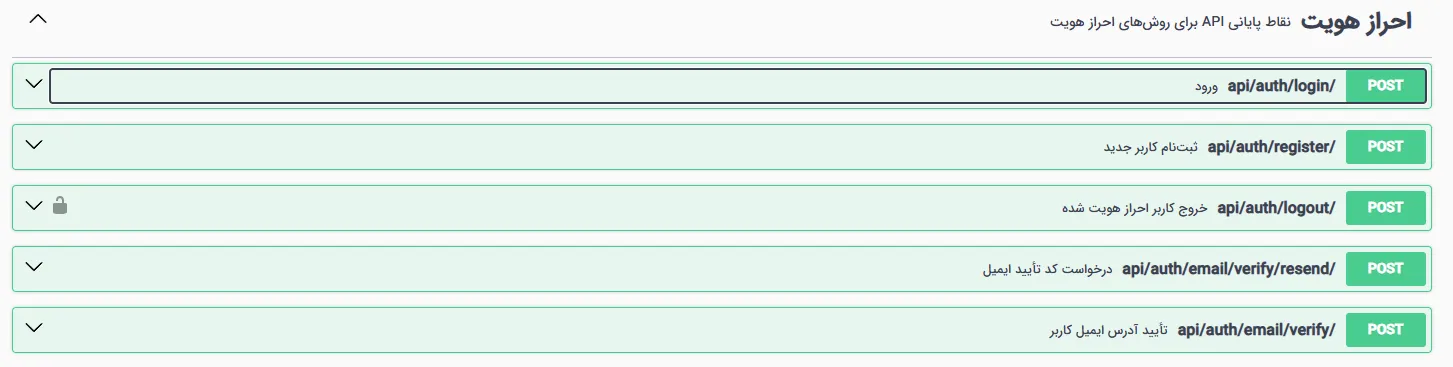
A Look Inside the API Interface
Simple and practical interface — click any image to enlarge.
Frequently Asked Questions About the DeepFA AI API
Answers to common developer questions about using the API — contact support if you don't find your answer.
Get Your API Key and Start Building Today
Free sign-up, a key in seconds, and credit that never expires