Chat with 7 Top AI Models
in One Unified Platform
Chat with the world's most advanced AI models including Claude for writing, DeepSeek for coding, Perplexity for internet search and Gemini for multipurpose tasks. Upload files, speak via voice input, use the prompt library and consult with 45+ specialized chatbots — all in one platform.
DeepFA AI Chat Pro — The Most Powerful Chatbot with 7 Top Global Models in One Platform
DeepFA AI Chat Pro is an advanced, all-in-one chatbot that gives you simultaneous access to 7 top global AI models: Claude (by Anthropic), excelling at creative writing and deep analysis; Gemini (by Google), a multipurpose model with excellent performance across a wide range of tasks; DeepSeek, highly powerful for coding and technical tasks; Perplexity AI, ideal for internet search and finding up-to-date information; Grok (by xAI), known for its distinctive and witty responses; and ChatGPT and GPT mini (by OpenAI), designed for fast general-purpose responses. No more paying for and managing multiple separate services.
Beyond text chat, Chat Pro offers advanced features including file upload (PDF, text and image), voice input, a prompt library with hundreds of ready-to-use samples and Brand Voice. With file upload, the AI reads your document content and responds based on it — ideal for summarization, analysis and information extraction. Voice input enables hands-free conversation and the prompt library puts hundreds of ready-made instructions at your fingertips.
In addition to general models, over 45 pre-configured specialized chatbots are available for various fields — from cooking and legal consulting to psychology, fitness coaching, finance and SEO. Each chatbot is pre-configured with its own role, prompt and behavior, ready to chat without any prompt writing.
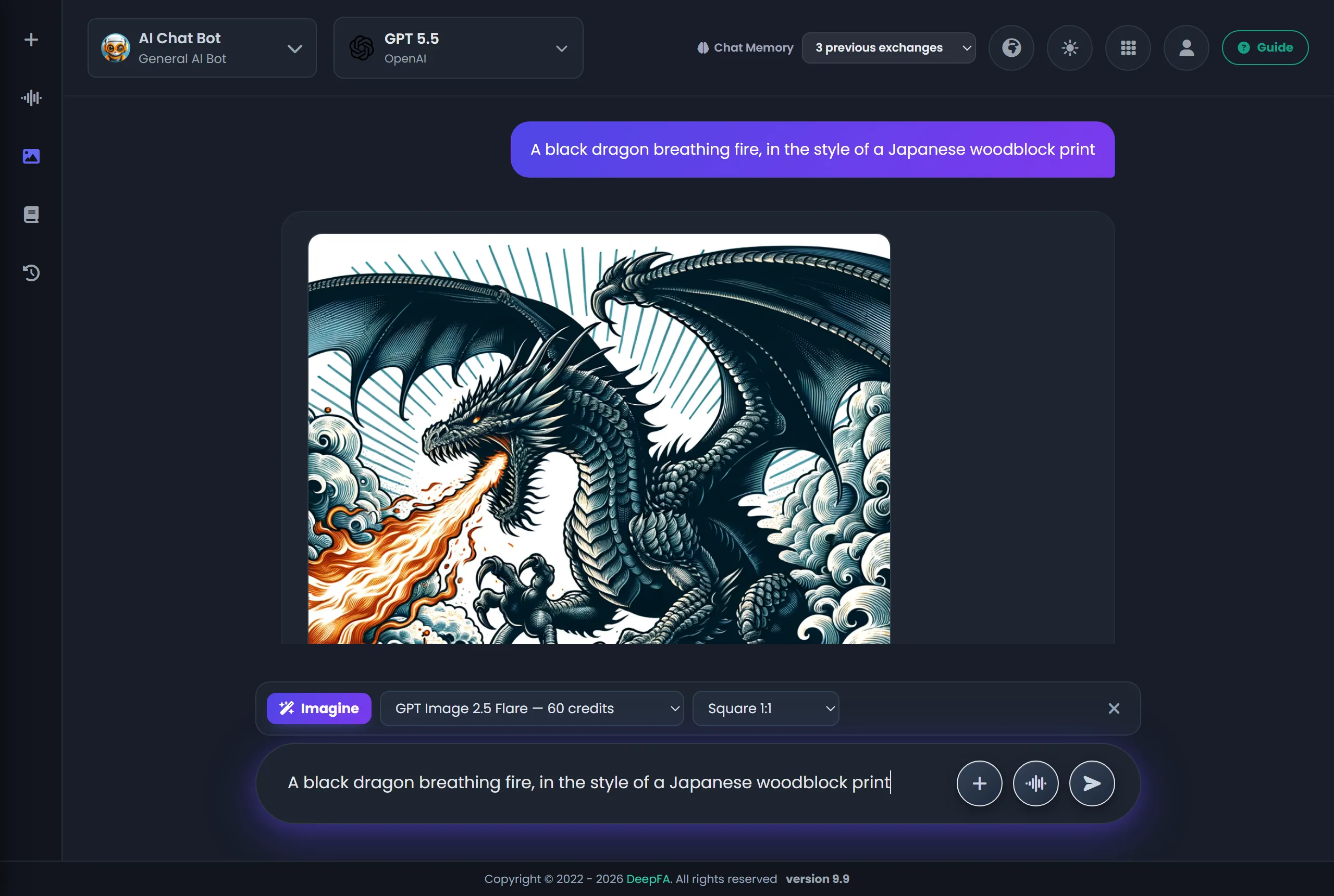
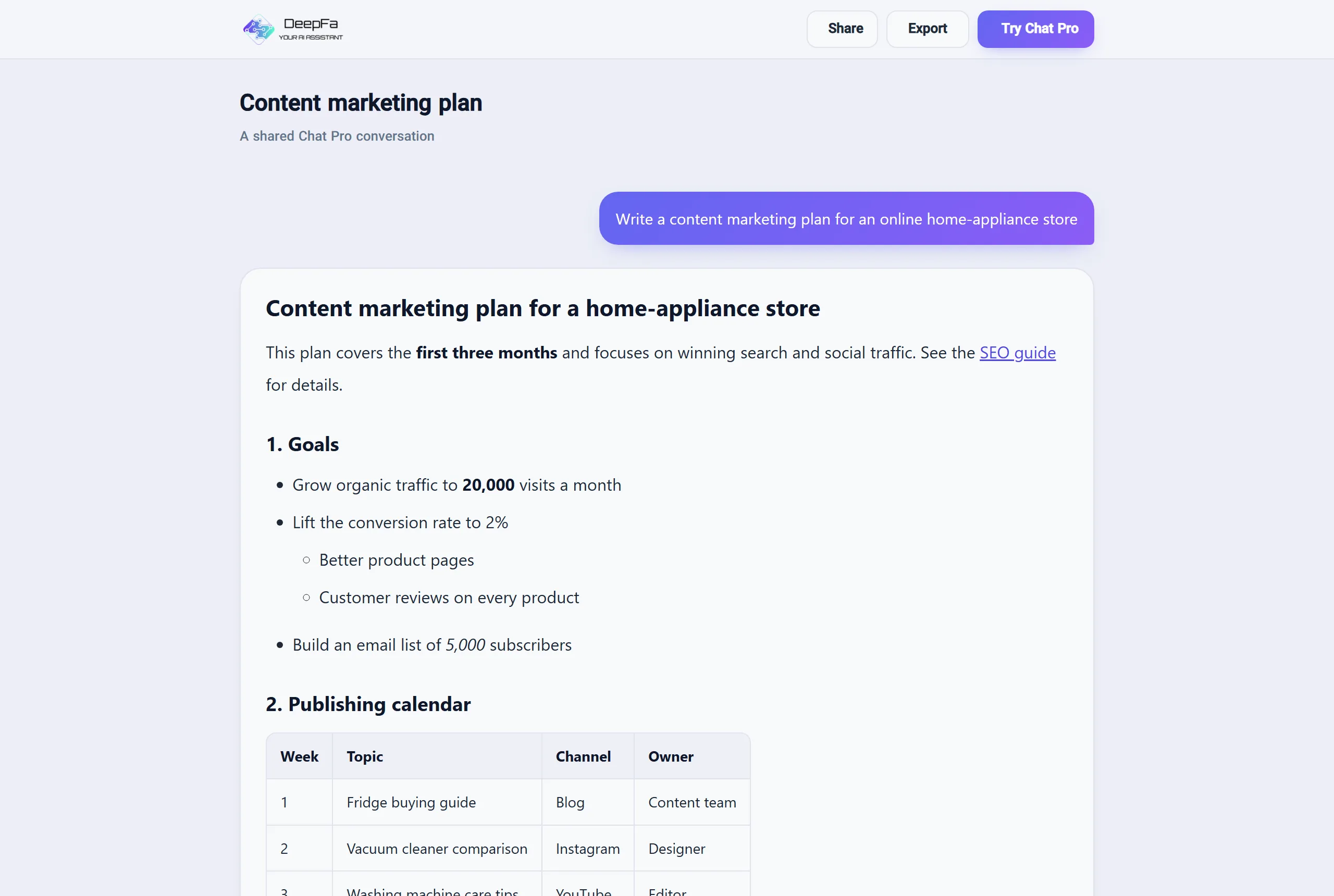
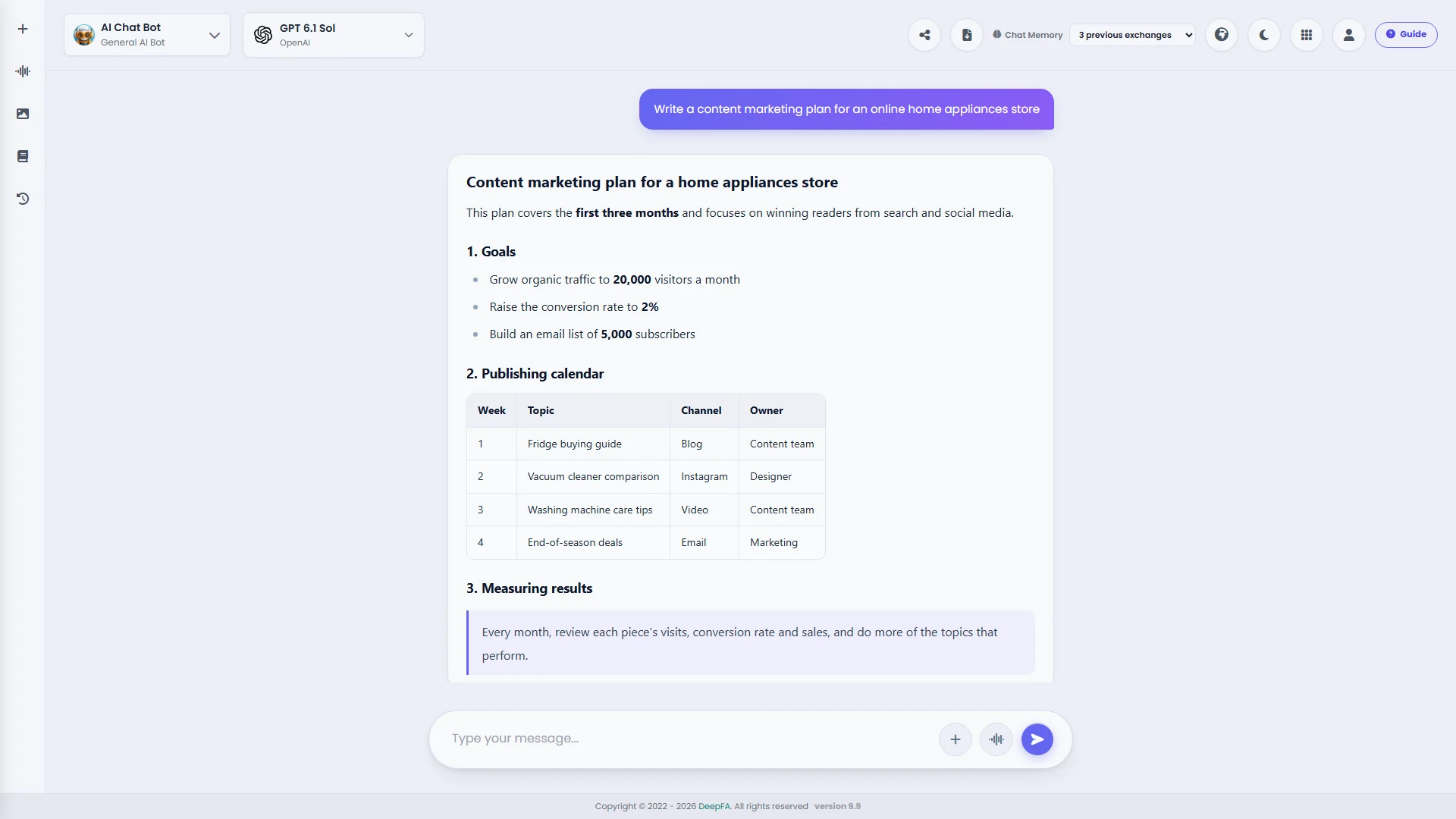
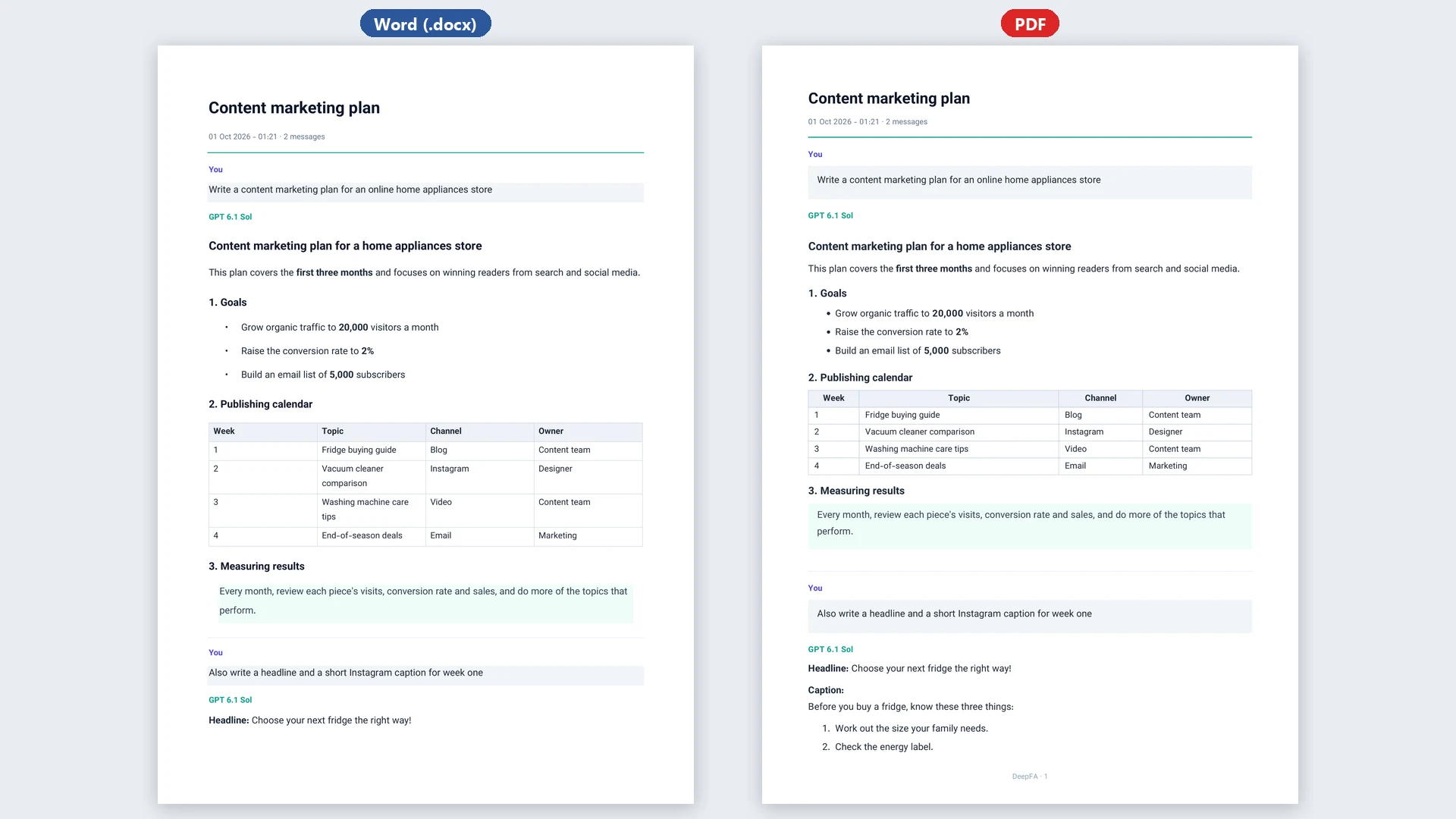
Chat Pro now goes beyond text chat: knowledge bases let you upload your working files once and connect them to any chat, so the answers come from your own documents; you can send a screenshot or a photo and the AI sees it and answers about it; Imagine makes a picture with Nano Banana, GPT Image or FLUX right in the conversation — from text or from your own photos; every conversation has its own address and a read-only share link, and can be downloaded whole as a Word or PDF file; any answer can be exported as Word, PDF, Markdown or text, read aloud, or made again. The page itself has been redesigned in light and dark themes, with easier-to-read answers and code in highlighted blocks with a copy button.
All conversations are saved and searchable. Whether you are a writer seeking inspiration, a programmer needing technical help, a researcher summarizing scientific papers, a student solving exercises or a marketer developing content strategy — DeepFA AI Chat Pro is your ultimate tool. All models fully support the Persian language.
7 Top AI Models on One Page — The Right Model for Every Task
Each model is optimized for a specific type of task — choose the one that fits your needs
GPT mini
Fast & AffordableChatGPT
General PurposeClaude
Writing & AnalysisGemini
MultipurposeGrok
Witty & FunPerplexity
Internet SearchDeepSeek
Coding & TechnicalEach of the 7 AI models above has its own strengths and specializations. By choosing the right model for each task, you will get the best possible results. For example, if you are looking for creative writing or deep analysis, Claude is the best choice. For coding and technical tasks, DeepSeek performs exceptionally well. And for searching up-to-date information from the internet, Perplexity is ideal. You can switch between models during a conversation and compare results.
Why DeepFA AI Chat Pro Is the Best Choice
Experience the power of 7 top AI models with a single subscription and forget about signing up for multiple services.
Access 7 Top Models in One Place
Simultaneous access to Claude, Gemini, Grok, Perplexity, DeepSeek, ChatGPT and GPT mini — no separate registration or subscription for each service.
Attach & Analyse Files
Attach a PDF, Word, PowerPoint, text or code file; it is uploaded at once and the AI answers from it for the rest of the conversation, whichever model you pick.
Send a Picture and Ask
Send or paste a screenshot of your site, a photo of an error or a chart, and ask about it; GPT, Claude, Gemini and Grok models see pictures.
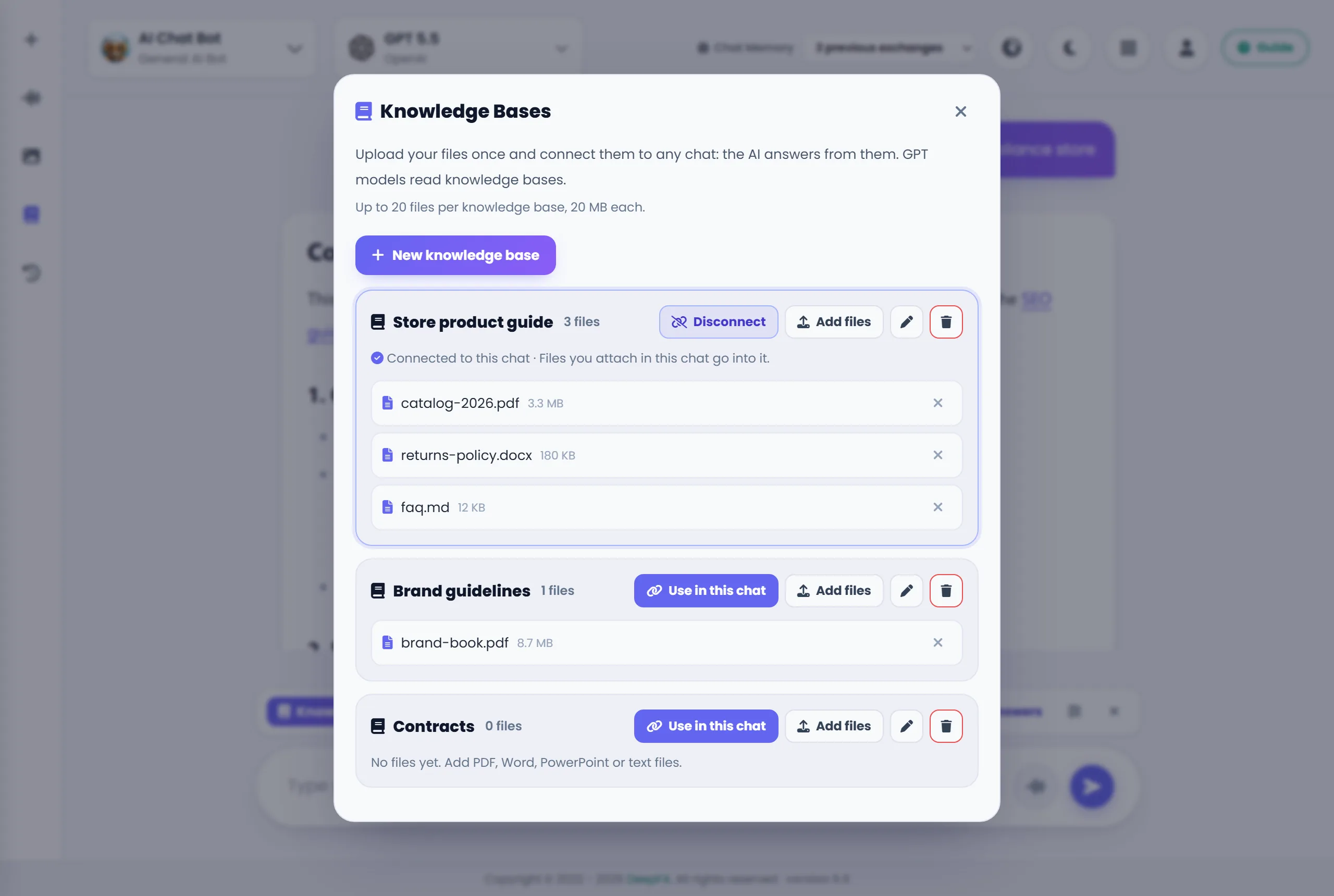
Knowledge Bases — Upload Once, Use in Any Chat
Put your catalogue, policies or brand guide in a knowledge base and connect it to any chat, so the answers come from your own documents.
Pictures Made Mid-Conversation
With Imagine, make a picture with Nano Banana, GPT Image or FLUX in the same conversation — from text or from up to 4 reference images; each model's price is shown first.
Share Links and Word & PDF Export
Share a conversation through a read-only link, download the whole conversation as a Word or PDF file, and export any answer as Word, PDF, Excel, Markdown or text — or ask for a file in your message.
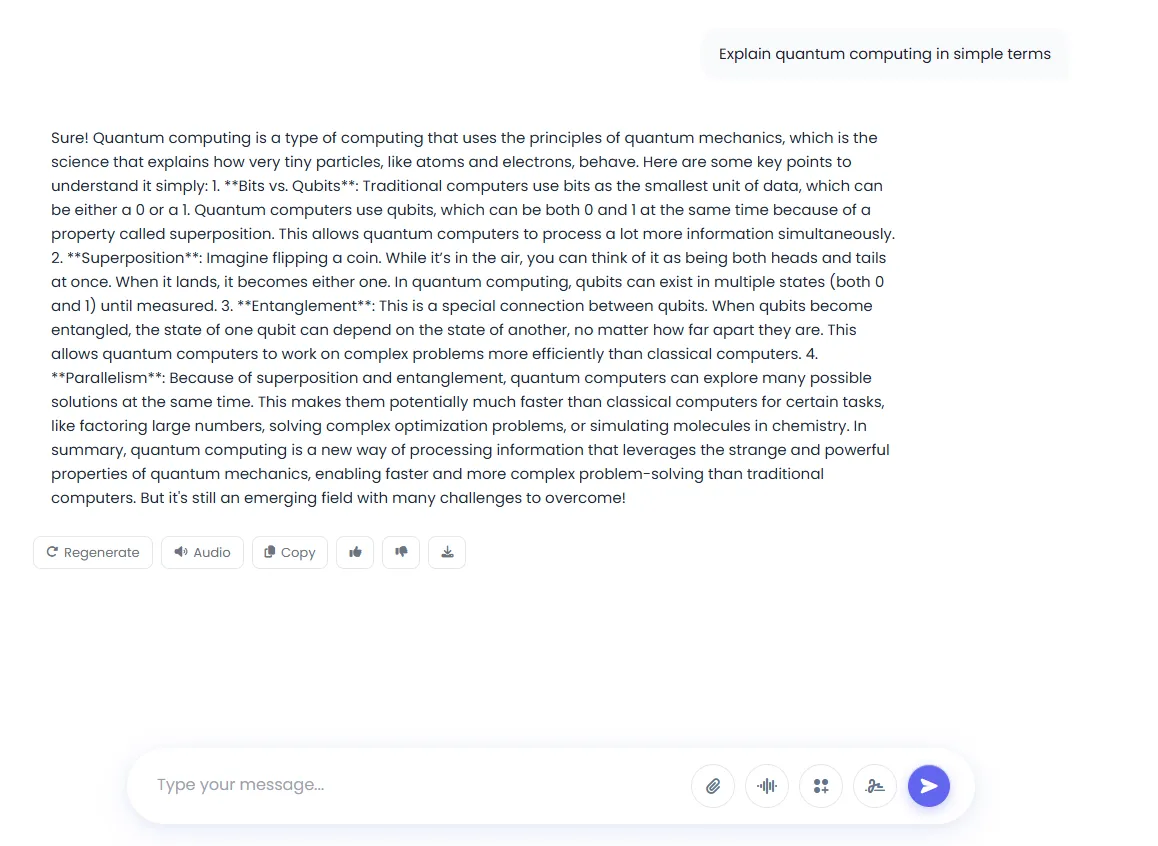
Regenerate Any Answer, Copy Code, Listen
Make any answer again, read code in highlighted blocks with a copy button, and hear the answer read aloud — in Persian too.
Live Voice Conversation
Speak instead of typing and hear the answer back — a spoken conversation saved in the same history, beside the typed ones.
Prompt Library with Hundreds of Ready Samples
Access hundreds of ready-to-use optimized prompts for all tasks — from writing and coding to research and analysis.
Brand Voice for Consistent Content
Set your brand's writing tone and style so all AI-generated content stays consistent with your visual and verbal brand identity.
45+ Ready Specialized Chatbots
Pre-configured chatbots for various fields: cooking, law, psychology, fitness, finance, SEO and many more.
Web Search Inside the Chat
The AI searches the web mid-conversation and answers from up-to-date information.
Search Across Your Own Files
Upload your files and let the AI search through them as the conversation goes on.
Project Folders with Standing Instructions
File conversations into colour-coded folders and give each folder standing instructions — tone, format, who you are — that go with every message in it.
Access to 7 top AI models in one unified platform eliminates the need for separate registrations and subscriptions for each service. Each model is optimized for specific types of tasks and you can choose the best model for your needs — from writing and analysis to coding and search. Features like file upload, voice input and prompt library take your AI conversation experience to the next level.
How to Use 7 AI Models in 4 Simple Steps
Start your first AI conversation in under a minute.
Choose one of 7 top AI models
From Claude, Gemini, Grok, Perplexity, DeepSeek, ChatGPT and GPT mini, choose the model that fits your task. For example, Claude for creative writing and DeepSeek for coding.
Write your question or speak it
Type your request in the chat box. Or click the voice input button and speak directly with the AI.
(If needed) A file, a knowledge base or Imagine
From the + menu attach a file or switch on web search, connect a knowledge base to the chat, or turn on Imagine to make a picture instead of text. The prompt library is there too.
Hit Send; keep the answer, make it again or share it
The answer comes from the model you chose. Make it again, hear it read aloud, export it as Word or PDF, download the whole conversation as a Word or PDF file, or share it through a link.
Who Benefits Most from DeepFA AI Chat Pro?
From writers and programmers to researchers and marketers
Writers & Content Creators
Generate articles, stories, blog posts, rewrites and professional text editing
Programmers & Developers
Code debugging, new code generation and technical documentation with DeepSeek
Researchers & Academics
Data analysis, scientific paper summarization and up-to-date information search
Students
Homework answers, exercise solving, exam prep and understanding complex concepts
Marketers & Business Managers
Campaign idea generation, advertising copy and content strategy development
Legal Professionals & Advisors
Contract analysis, important clause extraction and legal document summarization
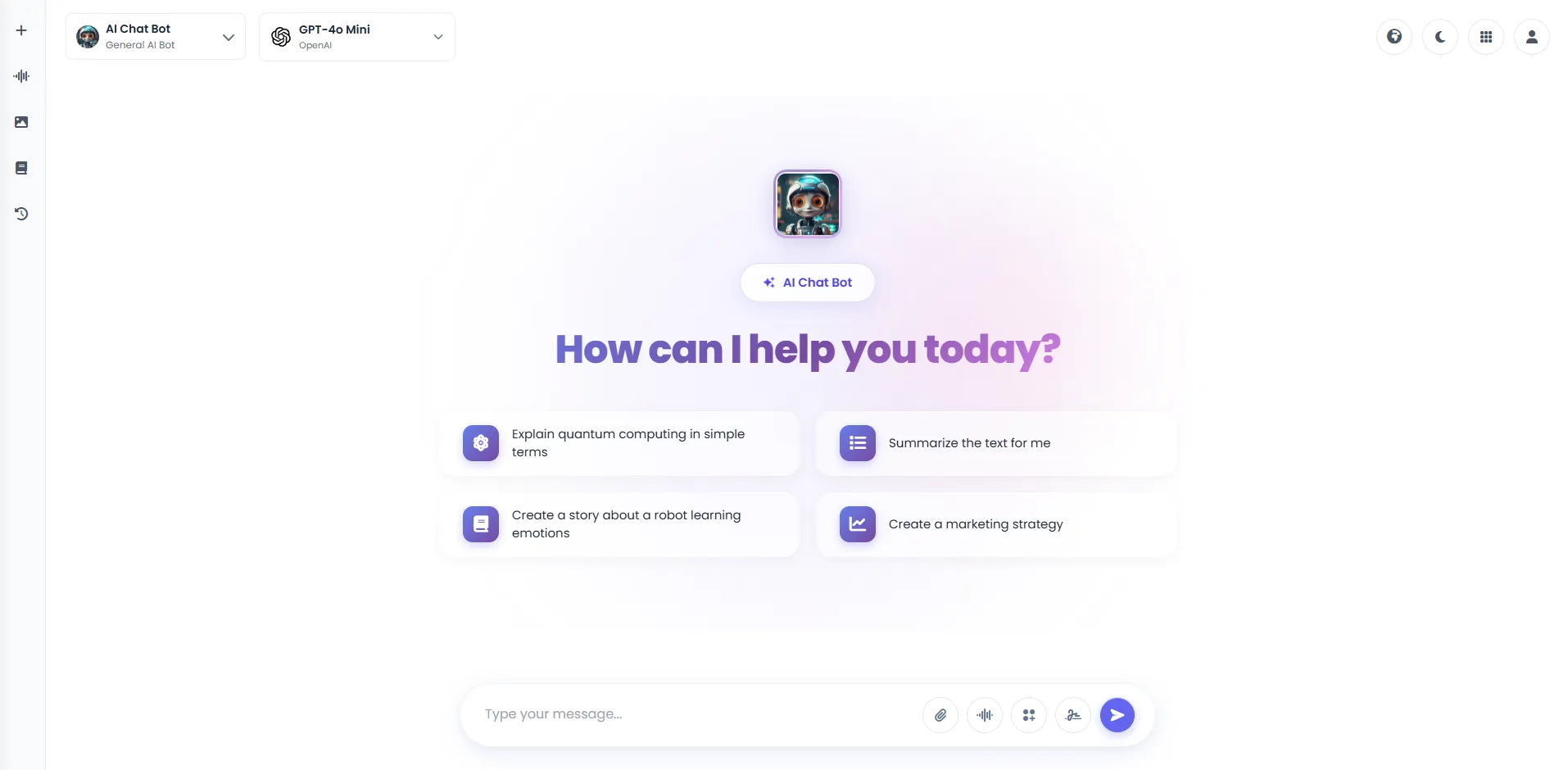
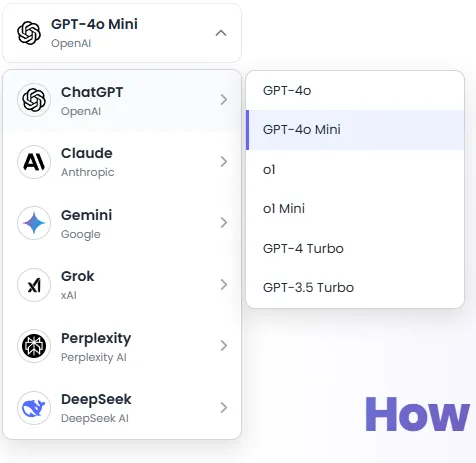
DeepFA AI Chat Pro User Interface
Real screenshots of the Chat Pro page — click any image to enlarge.
What is AI Chat Pro and what is it used for?
From access to 7 top AI models to file upload and voice input — everything you need to know about the professional AI chat tool.
DeepFA AI Chat Pro is an advanced platform for chatting with 7 top global AI models. The key difference from regular chatbots is that you can leverage the strengths of different models without needing separate registrations. For example, Claude excels at creative writing and deep analysis, DeepSeek is highly powerful for coding and technical tasks, Perplexity AI is ideal for internet search and up-to-date information, and Gemini performs excellently across a wide range of multipurpose tasks. You can switch models during a conversation and compare different responses.
Beyond general models, Chat Pro offers other professional capabilities: file upload (PDF, text and image) so AI reads and analyzes your document content, voice input for hands‑free conversation, a prompt library with hundreds of ready samples for quick starts, Brand Voice to align response tone with your organizational identity, and over 45 pre‑configured specialized chatbots for fields like law, psychology, nutrition, SEO, etc. All your conversations are saved and searchable. All models fully support the Persian language.
7 top models in one platform — easy comparison and selection
With Chat Pro you can simultaneously use Claude (writing and analysis), Gemini (multipurpose), Grok (witty and different), Perplexity (internet search), DeepSeek (coding), ChatGPT and GPT mini (general response). No separate registrations, choose the right model for each task.
Switch models mid‑conversation — compare answers
Ask a question, see Claude's response, then switch to DeepSeek or Perplexity and compare. Find the best model for each type of task. All responses are saved in one conversation.
Attached files and knowledge bases — answers from your own documents
Attach a PDF, Word, PowerPoint or text file, or put it once in a knowledge base and connect that to any chat. Whichever model you pick answers from those files: summaries, key points, finding one clause in a contract and more.
Send a picture — the AI sees it
Send a screenshot of a page of your site, a photo of an invoice, an error or a chart, and ask about it; pasting it into the message box with Ctrl+V is enough. Up to 4 pictures with a message, and the questions that follow are answered about the same pictures.
Imagine — a picture in the same conversation
Without leaving for another tool, make a picture with Nano Banana, GPT Image or FLUX; if you have a photo, add up to 4 reference images or paste it into the message box. Each model's price is beside its name and the picture is kept in your gallery too.
Voice input — hands‑free conversation
When you don't feel like typing or your hands are busy, click the voice button and say your question. AI recognizes your speech and responds.
Prompt library — hundreds of ready commands for quick start
Not sure what to ask? Use the prompt library. Commands for writing, coding, analysis, translation, rewriting, etc. are placed in the chat box with one click.
45+ specialized chatbots — no prompt writing needed
Chef, legal advisor, psychologist, fitness coach, SEO specialist and dozens more. Each is pre‑configured with its own prompt and behavioral instructions. Just choose and start chatting.
For professional use of Chat Pro, start with a general model like ChatGPT and ask simple questions. Then for more specialized tasks, choose the right model: Claude for writing and analysis, DeepSeek for coding, Perplexity for up‑to‑date information. If you need to analyze file content, use the upload button. If you have repetitive questions, use the prompt library. All your conversations are saved in history and you can return to them at any time.
Tools That Complement AI Chat Pro in the DeepFA Ecosystem
Combine Chat Pro with other DeepFA AI tools for a more complete experience
Which chat model should I pick?
Model prices differ by dozens of times. An economical model is enough for everyday work, a premium one for heavier tasks; how many answers 1,000 credits buy with each is in the table. Every one of them is in every plan.
About 1,731 answers for 1,000 credits.
About 865 answers for 1,000 credits.
About 230 answers for 1,000 credits.
About 184 answers for 1,000 credits.
About 510 answers for 1,000 credits.
| Model | Maker | Tier | For 1,000 credits | Cost (per question and answer) |
|---|---|---|---|---|
| Claude Haiku 5.5 | Anthropic | Economical | about 865 answers | 1.1 credits about 230–350 Toman |
| Claude Sonnet 5.5 | Anthropic | Mid-range | about 64 answers | 15.4 credits about 3,080–4,620 Toman |
| Claude 5 Sonnet | Anthropic | Mid-range | about 60 answers | 16.4 credits about 3,290–4,930 Toman |
| Claude Opus 5.5 | Anthropic | Premium | about 32 answers | 30.8 credits about 6,160–9,240 Toman |
| Claude 5 Opus | Anthropic | Premium | about 25 answers | 38.5 credits about 7,700–11,550 Toman |
| Claude Fable 5 | Anthropic | Premium | about 12 answers | 77 credits about 15,400–23,100 Toman |
| Claude Fable 5.1 | Anthropic | Premium | about 5 answers | 192 credits about 38,500–57,750 Toman |
| DeepSeek V4.1 Flash | DeepSeek | Economical | about 510 answers | 1.9 credits about 390–590 Toman |
| DeepSeek V4 Pro | DeepSeek | Mid-range | about 55 answers | 17.8 credits about 3,580–5,370 Toman |
| Gemini 3.7 Flash | Economical | about 230 answers | 4.3 credits about 870–1,300 Toman | |
| Gemini 3.8 Flash | Economical | about 230 answers | 4.3 credits about 870–1,300 Toman | |
| Gemini 3.1 Pro | Mid-range | about 80 answers | 12.4 credits about 2,490–3,730 Toman | |
| Gemini 4 Argon | Mid-range | about 64 answers | 15.4 credits about 3,080–4,620 Toman | |
|
GPT 6 Luna
Cheapest
|
OpenAI | Economical | about 1,731 answers | 0.57 credits about 120–170 Toman |
| GPT 6.1 Terra | OpenAI | Economical | about 173 answers | 5.7 credits about 1,160–1,730 Toman |
| GPT 6.1 Sol | OpenAI | Mid-range | about 86 answers | 11.5 credits about 2,310–3,470 Toman |
| GPT 5.3 Codex | OpenAI | Premium | about 51 answers | 19.3 credits about 3,870–5,810 Toman |
| GPT 6 Astra | OpenAI | Premium | about 18 answers | 53.9 credits about 10,780–16,170 Toman |
| Sonar | Perplexity | Premium | about 39 answers | 25.5 credits about 5,110–7,670 Toman |
| Sonar Reasoning Pro | Perplexity | Premium | about 18 answers | 53.9 credits about 10,780–16,170 Toman |
| Grok 4.3 | xAI | Economical | about 184 answers | 5.4 credits about 1,090–1,630 Toman |
| Grok 4.6 | xAI | Economical | about 91 answers | 10.9 credits about 2,180–3,280 Toman |
| Grok 4.7 | xAI | Economical | about 91 answers | 10.9 credits about 2,180–3,280 Toman |
This table is built from DeepFA's current models and prices and changes the same day a price changes or a model is added. Toman follows what a credit costs in the plans and packs (about 200–300 Toman); each job's exact cost is shown before it is made, and credit is returned if it fails. An "ordinary question and answer" here is about 1,500 tokens in (a question with some context) and 800 tokens out; a shorter answer costs less and a long conversation more.
What 100 ordinary questions and answers cost
- GPT 6 Luna57.7 creditsabout 11,550–17,330 Toman
- Claude Sonnet 5.51,540 creditsabout 308,000–462,000 Toman
- Claude Fable 5.119,250 creditsabout 3,850,000–5,775,000 Toman
Frequently Asked Questions About DeepFA AI Chat Pro
Everything you need to know about Chat Pro and AI models is answered here.
Start Chatting with 7 Top AI Models Now
Free sign-up in under one minute — instant access to 7 top AI models and 45+ specialized chatbots