AI Voice Cloning & Replication
Clone Any Voice in 1 Minute
Upload just 1–2 minutes of high-quality, noise-free audio and DeepFA AI clones and replicates your voice. The cloned voice is instantly available for text-to-speech, letting you convert any text to natural speech with the new voice.
AI Human Voice Cloning and Replication — From Audio File to Cloned Voice in Minutes
DeepFA's AI voice cloning tool leverages advanced deep learning models to copy and replicate any human voice with just 1–2 minutes of audio. Upload a high-quality, noise-free MP3 file and the AI system analyzes and reconstructs speech patterns, tone, speaking speed and unique vocal characteristics with high precision. The cloned voice is immediately available for text-to-speech conversion.
In the voice cloning process, input audio sample quality matters far more than the number of files. A single clear MP3 without background noise outperforms multiple low-quality recordings. You can also select cloned voice gender (Male or Female) and optionally describe the voice including age, accent and tone to improve replication quality. Re-training of previously cloned voices is also supported.
The cloned voice is automatically added to the text-to-speech voice list after creation. Final output can be downloaded in MP3, WAV and OGG formats with various quality settings. Use this tool for podcasts, video narration, audiobooks, content dubbing, game dialogues, accessibility support and much more.
Key Features of the AI Voice Cloning Tool
Everything you need to copy and replicate a human voice with AI
Quick Clone with 1–2 Min Sample
Just 1–2 minutes of clear, noise-free audio is enough for AI to analyze speech patterns and reconstruct the voice.
Quality Over Quantity
A single high-quality, noise-free file outperforms multiple low-quality recordings. Remove noise before uploading.
Voice Gender Selection (Male/Female)
Select Male or Female gender for the cloned voice to get more accurate and natural cloning results.
Re-Train and Improve Existing Voice
Re-train a previously cloned voice by uploading new samples to improve its quality and accuracy.
Instant Text-to-Speech Integration
The cloned voice is immediately available in the text-to-speech tool with no extra configuration needed.
Optional Description for Better Cloning
Describe age, accent, tone and vocal characteristics so AI produces more accurate cloning results.
Clone and Replicate a Voice in 4 Simple Steps
The voice cloning process is simple, fast and requires zero technical knowledge
Prepare a Noise-Free Audio File
Prepare a high-quality MP3 file without background noise, 1–2 minutes long. Max size: 100MB. The cleaner the file, the better the cloning result.
Set Name, Gender and Voice Description
Enter a name for the new voice, select gender (Male or Female) and optionally describe age, accent and tone.
Upload File and Create Cloned Voice
Upload the audio file and click Create Voice. AI analyzes the voice pattern and builds the cloned voice in moments.
Use Cloned Voice in Text-to-Speech
The cloned voice appears instantly in the text-to-speech voice list. Write text and hear it in the new voice. Output is downloadable in multiple formats.
Who Uses the Voice Cloning Tool?
From podcasters and video creators to game developers and audiobook producers
Podcasters
Record narration and speech with a consistent voice without constant studio presence
Video Content Creators
Generate video narration with any desired voice anytime, anywhere
Game Developers
Create unique dialogues for each game character with a distinct cloned voice
Audiobook Producers
Convert books to audio with consistent, professional voice across all chapters
Dubbing and Content Localization
Clone an actor or narrator voice for dubbing content into different languages
Accessibility for Speech-Impaired
Reconstruct voices of individuals who have lost or may lose their ability to speak
Voice Cloning Benefits at DeepFA
Why DeepFA voice cloning is the best choice for AI-powered human voice replication.
Entire Voice Cloning Process Under 5 Minutes
From uploading the audio file to having a ready cloned voice, the entire process takes less than 5 minutes. No technical knowledge required.
Precise Speech Pattern and Tone Reconstruction
Advanced AI models reconstruct speech patterns, tone, speaking speed and unique vocal characteristics with high precision.
Direct and Automatic Text-to-Speech Integration
No extra setup needed. The cloned voice is immediately added to the text-to-speech voice list and ready to use.
Re-Training and Cloned Voice Improvement
Anytime, upload new audio samples to re-train and improve the quality of a previously cloned voice.
MP3 Format Support up to 100MB
Standard MP3 format is supported. Lighter, higher-quality files with proper bit rate deliver the best voice cloning results.
Audio Output in 3 Formats
Download generated audio in MP3, WAV and OGG formats with various quality settings for different use cases.
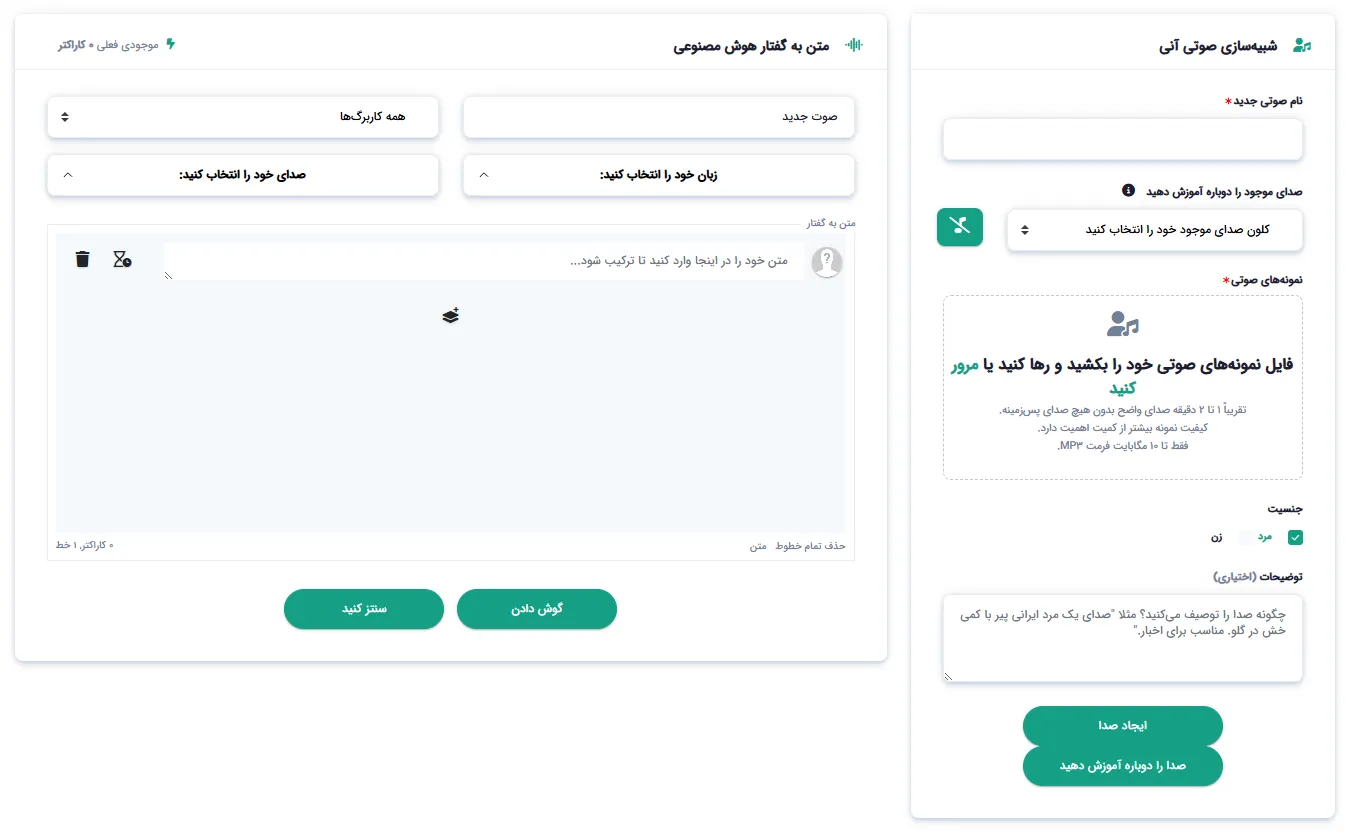
Simple and Practical DeepFA Voice Cloning Interface
Screenshots of the voice cloning tool — from file upload to text-to-speech usage
What is AI voice cloning and how does it work?
From sample length and quality to re‑training and text‑to‑speech integration — everything you need to know about AI voice cloning.
AI voice cloning is a process where advanced deep learning models analyze and reconstruct a person's unique speech patterns, tone, speed and vocal characteristics from a short audio sample. Unlike traditional methods that required hours of recording and processing, DeepFA's tool needs only 1–2 minutes of high‑quality, noise‑free audio. The result is a cloned voice that mimics the original speech pattern with high accuracy. The key difference from other voice‑cloning solutions is the fast processing time (under 5 minutes) and direct integration with the text‑to‑speech tool — the cloned voice is immediately available for TTS without any extra configuration.
At DeepFA, the voice cloning process has several unique features. First, sample quality matters far more than file count. A single clear, noise‑free MP3 gives better results than multiple low‑quality files. Second, you can select the gender of the cloned voice (Male or Female) and optionally provide a description including age, accent and tone to improve reconstruction quality. Third, the Re‑Train feature lets you upgrade an existing cloned voice by uploading new samples. All cloned voices are saved in your history, and final output can be downloaded in MP3, WAV and OGG formats.
1–2 minute audio sample — why is this enough?
DeepFA AI models analyze just 1–2 minutes of clear, noise‑free audio to reconstruct speech patterns, tone, speed and vocal characteristics with high accuracy. Long files are not needed.
Quality vs. quantity — why one good file beats several bad ones
In voice cloning, sample quality matters far more than file count. A single high‑quality, noise‑free MP3 with proper bit rate delivers much more accurate results than multiple low‑quality recordings.
Re‑training — how to improve a cloned voice
If you are not satisfied with the cloned voice quality or have a better sample, use the Re‑Train feature. Upload a new sample, and the model retrains to improve reconstruction accuracy.
Voice description — age, accent, tone and vocal traits
Although optional, providing details like age (e.g., "middle‑aged male"), accent (e.g., "British") and tone (e.g., "formal" or "friendly") can help improve cloning quality.
Instant text‑to‑speech integration
After creating a cloned voice, it is automatically added to the text‑to‑speech voice list. Without any extra configuration, convert any text to natural speech using the new voice.
Auto‑saved history and multi‑format output
All cloned voices are saved in your history and always accessible. Download generated speech in MP3, WAV and OGG formats.
For best results in voice cloning, follow these tips: use a high‑quality MP3 file (128 kbps or higher), remove background noise (use noise reduction tools), ensure your voice is clear with no other speakers, and split the file into 1‑2 minute segments (longer files do not necessarily improve quality). Also, if you get a better sample later, use the Re‑Train feature to upgrade the existing cloned voice. All cloned voices are saved in history and always retrievable.
Other DeepFA AI Audio Tools
From music generation and text-to-speech to audio transcription and voice detection
Frequently Asked Questions About AI Voice Cloning
Answers to all your questions about how voice cloning works, quality and use cases
Clone and Replicate Your Voice Right Now
Upload just 1 minute of audio and AI reconstructs your voice — instantly ready for text-to-speech