AI Voice Isolator & Noise Removal
Remove Background Noise
Isolate human voice from background noise, wind, crowd chatter and ambient interference with advanced AI. Get a clear, clean audio file.
AI Voice Isolation & Background Noise Removal — Clear and Noise-Free Audio
DeepFA's Voice Isolator leverages advanced AI algorithms and deep learning to accurately separate and extract human voice from ambient noise, wind sounds, crowd chatter, traffic noise, background music and other unwanted sounds. It is designed for podcasters, video creators, journalists, researchers, students, lawyers and anyone who needs clear, high-quality audio files.
Using AI-powered voice separation technology, audio and video files in various formats including MP3, MP4, WAV, M4A, OGG, MPEG, WEBM and M4A are processed seamlessly. Files up to 500MB can be uploaded and processed without limitations. Simply upload your file via drag and drop and the AI automatically separates human voice from ambient noise.
The final output contains an audio file with clear speaker voice and no background noise. Use this tool to enhance podcasts, interviews, online classes, webinars, recorded calls, online meetings, educational videos and legal recordings.
Key Features of the AI Voice Isolator Tool
Everything you need to remove background noise and isolate human voice
Accurate Human Voice Isolation from Background Noise
Accurately separate and extract human voice from ambient noise, wind, crowd chatter and unwanted sounds.
Clear & Noise-Free Audio Output
The final output file contains clear human voice with zero ambient noise or unwanted interference.
Support for 8 Common Audio Formats
MP3, MP4, OGG, MPEG, M4A, WAV, WEBM and M4A formats supported — no conversion needed.
Upload Large Files up to 500MB
Large audio and video files up to 500MB can be uploaded and processed without limitations.
Quick Drag-and-Drop Upload
Drag and drop your file or browse to select it and start processing in seconds.
Smart Processing with Advanced Algorithms
Advanced AI algorithms accurately detect and separate human voice from noise.
Remove Noise and Isolate Voice in 4 Simple Steps
The audio cleanup process is simple, fast and requires zero technical knowledge
Upload Audio or Video File
Upload your audio or video file using drag and drop or Browse. Supports 8 formats and files up to 500MB.
AI-Powered Smart File Analysis
AI analyzes the file, identifies and separates human voice, background noise and unwanted sounds.
Isolate Human Voice from Ambient Noise
Advanced AI technology separates the speaker's voice from unwanted sounds, ambient noise and background audio.
Download Clear and Noise-Free Audio
The final file with much clearer voice and reduced noise is ready to download and use in your projects.
Who Uses the Voice Isolator and Noise Removal Tool?
From podcast producers and content creators to lawyers and researchers
Podcast & Radio Producers
Remove ambient noise from podcast recordings for cleaner, more professional audio
Interviews & Conversations
Isolate interviewee voice from crowded and noisy environments
Video Production
Clean audio recorded at filming locations and outdoor environments
Online Classes & Webinars
Improve teacher and speaker audio quality by removing surrounding noise
Call & Meeting Recordings
Clean up phone conversations, online meetings and conference audio
Legal & Forensic Recordings
Isolate desired voice from noisy recordings for legal proceedings
Voice Isolation & Noise Removal Benefits at DeepFA
Why voice isolation and noise removal with DeepFA is the best choice.
High Accuracy Voice-to-Noise Separation
AI accurately detects and separates human voice from all types of ambient noise including wind, traffic and crowd chatter.
Fast Processing and Instant Clean File Delivery
Audio files are processed in minimal time and the clean, noise-free file is ready for download.
8 Audio Format Support Without Conversion
Supports MP3, WAV, OGG, M4A and 4 more formats — upload your file directly without conversion.
Process Large Files up to 500MB
Long recordings and large files upload and process without issues — no compression needed.
Multiple File Upload Methods
Upload your file easily by drag and drop or by browsing through your file system.
Credit Balance Display Before Processing
View your credit balance before starting the processing so you can manage costs.
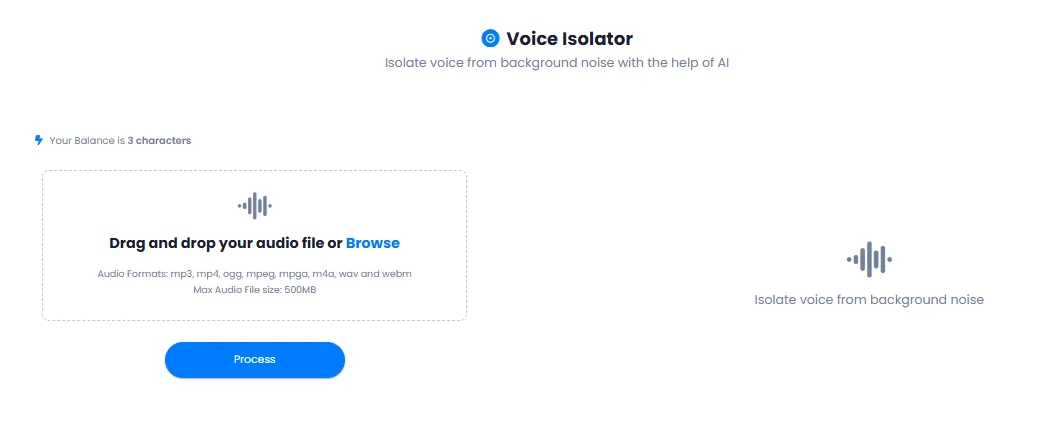
Simple and Practical DeepFA Voice Isolator Interface
Screenshots of the voice isolation tool — from file upload to receiving clean output
What is AI Voice Isolator and how does it work?
From background noise removal to accurate human voice isolation — everything you need to know about AI-powered audio cleanup.
AI voice isolation is a process where advanced deep‑learning algorithms accurately detect and separate human voice from background noise, wind, crowd chatter, traffic, ambient music and other unwanted sounds. Unlike simple noise removal tools that might also degrade parts of the original voice, DeepFA's technology removes only the disturbing noise while preserving the original human voice with full quality and clarity. The key difference is the high separation accuracy and the natural preservation of the speaker's voice.
At DeepFA, voice isolation is performed with support for 8 common audio formats (MP3, MP4, WAV, M4A, OGG, MPEG, WEBM and M4A) and files up to 500MB. Simply upload your file via drag and drop, and AI automatically separates human voice from background noise. The final output is a clean audio file with clear speaker voice and no ambient noise. This tool is designed for podcast producers, video content creators, journalists, researchers, lawyers and anyone who needs high‑quality audio files.
Accurate human voice isolation from all types of ambient noise
DeepFA AI accurately separates human voice from wind, crowd chatter, traffic noise, background music and other unwanted sounds. Only the human voice remains.
Advanced deep‑learning technology for voice separation
Deep‑learning models trained on millions of audio samples recognize human voice patterns from noise. The result is precise separation without degrading original voice quality.
8 supported audio and video formats
MP3, MP4, OGG, MPEG, M4A, WAV, WEBM and M4A formats can be uploaded and processed without prior conversion. Video files are also supported.
Upload large files up to 500MB
Long audio files and large recordings up to 500MB can be uploaded and processed without limitations. No need to compress or split files.
Preserve original voice quality while removing noise
Unlike simple noise removal tools that may degrade the original voice, DeepFA technology removes only unwanted noise while keeping the speaker's voice clear and natural.
Fast processing and instant output
Audio files are processed in minimal time and the clean, noise‑free file is ready for download without long waiting periods.
For best results in voice isolation and background noise removal, use high‑quality audio files. Files with constant, uniform noise (such as fan noise, wind or distant hum) give the best results. Files with very loud or irregular noise may reduce separation accuracy. Also, review your file before uploading and if there are very noisy sections, remove them. Always listen to the output after processing and if needed, reprocess the file. All processed files are saved in history and always accessible.
Other DeepFA AI Audio Tools
From music generation and voice cloning to text-to-speech and audio transcription
Frequently Asked Questions About AI Voice Isolation and Noise Removal
Answers to all your questions about how voice isolation works, supported formats, file size and use cases
Remove Background Noise and Isolate Human Voice Right Now
Upload your audio or video file and instantly receive a clean, noise-free output