AI YouTube Video to Text
Generate Text Content from Any Video
Paste a YouTube video URL and generate blog posts, summaries, outlines, descriptions and pros & cons. Choose AI model, tone and language.
Convert YouTube Videos to Text Content with AI
The DeepFA YouTube video to text tool helps you convert YouTube videos into ready-to-publish written content. Simply paste the video link and choose your desired output type such as full article, structured outline, main idea explanation, detailed description, summary, or pros and cons. The tool uses advanced artificial intelligence models to analyze video content and transform it into high-quality text.
This tool offers a wide range of customization options. You can select your preferred AI model, adjust the creativity level, change the writing tone, and define the content perspective. You can also choose the output language to create content for different audiences. By enabling the brand option, the writing style will align with your brand identity.
All outputs are saved as documents in your project workbook and can be fully edited in the rich text editor before final saving. You can also generate up to fifty variations from a single video, making it ideal for content testing, idea generation, and SEO optimization. This tool is perfect for bloggers, social media managers, researchers and businesses.
Key YouTube Video to Text Features
Everything you need to generate text content from videos — from URL input to final document saving.
YouTube Video to Text Converter
Paste a YouTube video URL and instantly generate ready-to-use content, including summaries, blog posts, article outlines, and more.
6 Content Output Formats
Transform video content into blog posts, summaries, article outlines, main idea explanations, detailed analyses, or pros and cons.
Choose Your AI Model
Choose the best OpenAI model for your task, including GPT-5, GPT-4o, Mini, Nano, and the O-series models.
Tone & Creativity Settings
Customize the writing tone, creativity level, and perspective to generate content tailored to your goals.
Multi-Language Content Generation
Generate content in English, Persian, and dozens of other languages for global audiences.
Save to Project Workbook
Save generated content as a document and organize it within your selected project workbook.
Full control over content style, tone and language
Adjust tone, point of view, language and creativity level so the output precisely matches your brand and audience needs.
Convert video to text in 4 simple steps
From pasting the video URL to saving the final document — a fast and simple process.
Enter Video URL
Paste the full YouTube video URL into the input field. This field is required.
Choose Output & Settings
Select output type (blog post, summary etc.), AI model, tone, creativity and language.
Generate Content
Click generate. AI analyzes the video and creates text based on your settings.
Edit & Save
Generated text appears in the rich editor. Edit and save it in your Workbook.
Who uses Video to Text?
From bloggers and researchers to businesses and podcasters.
Bloggers
Quickly convert tutorial videos to publication-ready blog articles
Social Media Managers
Create captions, descriptions and text content from YouTube videos
Journalists & Researchers
Extract summaries and key points from lengthy videos
Educators
Create study materials and educational content from tutorial videos
Podcasters
Convert YouTube videos into podcast scripts
Businesses
Convert product videos to web pages and SEO content
Video to Text Benefits at DeepFA
Why video content generation with DeepFA is the best choice for content creators.
Save Time
Instead of watching the full video, get ready text (article, summary) in seconds.
High Flexibility
Output type, language, tone, point of view and creativity are all adjustable.
Edit Before Saving
Text appears in a rich editor and you can edit before saving.
Generate Multiple Versions
Generate up to 50 different text versions from one video — perfect for A/B testing.
System Integration
Output saved as document in Workbook, synced with the Documents section.
Brand Compatibility
Enable Include Your Brand to incorporate your brand tone and name in the text.
Simple and powerful YouTube video to text interface
Screenshots of DeepFA video to text tool including URL input form, content settings and text editor.
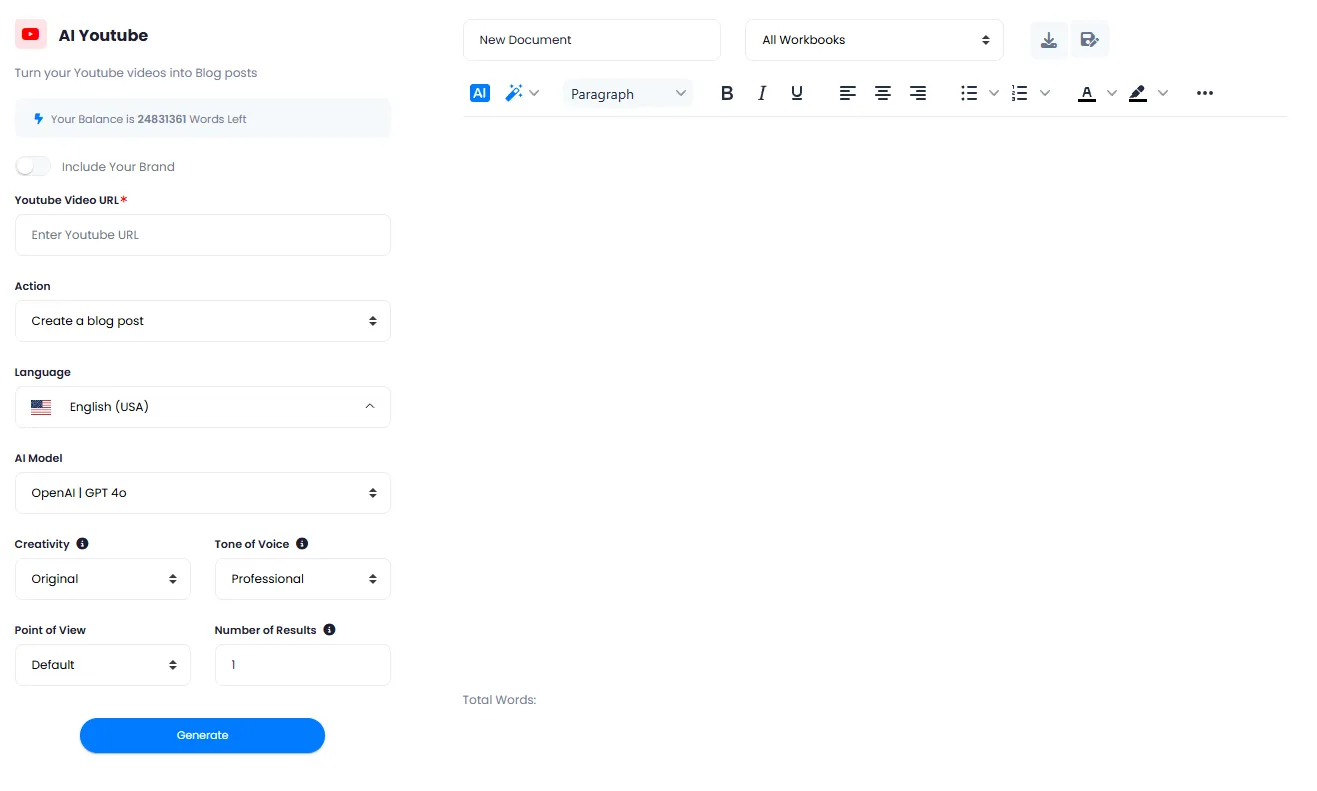
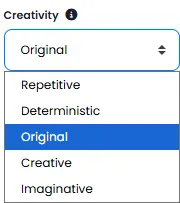
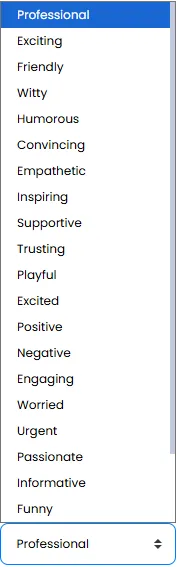
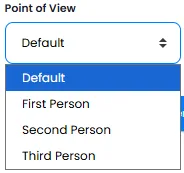
What is AI YouTube video to text and how does it work?
From six output types to model, tone and language selection — everything you need to know about turning video into written content with AI.
Converting a YouTube video to text with AI is a process where an advanced language model analyzes the audio content of a video and turns it into structured text. Unlike the traditional method of watching the video and manually taking notes, this tool delivers ready‑to‑use text in seconds — a full blog post, summary, article outline, main idea explanation, detailed analysis or pros & cons list. The key difference from simple text extractors lies in its advanced features: you can change the AI model, adjust the writing tone, choose the creativity level, set the point of view (first, second or third person) and even generate the text in multiple languages.
At DeepFA, video‑to‑text conversion is powered by 17+ OpenAI models (from GPT‑3.5 Turbo to GPT‑5 and the o‑series). Powerful models are ideal for deeper analysis and higher accuracy, while lightweight, fast models are perfect for quick, economical generation. You can also generate up to 50 different versions of one video and pick the best one. The final output is saved in your project Workbook and can be edited in the rich text editor.
Video to Text — how does AI analyze the video?
The tool takes a YouTube URL, extracts the audio and processes it with a language model. Then, based on your selected output type (blog post, summary, outline, etc.), it generates the text. No part of the video is manually heard or typed — everything is automatic.
Six output types — each for a different purpose
Full blog post (ready for publishing), article outline (for starting a draft), main idea explanation (for advertising and intro content), expanded description (for product pages and tutorials), content summary (for quick sharing), pros & cons (for comparison and analysis). Each output serves a different goal.
AI model — how the model affects quality and speed
Powerful models (GPT-5, GPT-4o, o1) are best for deep analysis and high accuracy. Lightweight, fast models (GPT-4o mini, GPT-5 nano) are ideal for quick, economical generation. You can test different models and find the best fit.
Tone, creativity and point of view — full content personalisation
Professional tone for formal content, friendly for personal blogs, inspiring for campaigns. Creativity from Repetitive (stays close to original) to Imaginative (creative changes). First person for personal narratives, second person for guides, third person for formal content.
Multi‑language output and brand inclusion — global content, aligned with identity
Set output language to any language you need (Persian, English, Arabic, Spanish, German, etc.). Enable "Include Your Brand" to automatically insert your brand name into the text.
Save and edit in the project Workbook — centralised document management
Generated text appears in a rich text editor. Before final saving, you can apply bold, italic, lists and other formatting. The document is then saved in your project Workbook and accessible from the Documents section.
For optimal results, first decide which output type fits your goal. If you need a complete blog article, choose "Full blog post". If you only need key points, "Content summary" is the best choice. For deep, accurate analysis, use powerful models (GPT-5 or o1 mini) with "Deterministic" or "Original" creativity. For fast daily content, lightweight models (GPT-4o mini) with "Original" creativity are sufficient. Always set the number of results to 2‑5 before final generation so you have several versions to compare.
Other AI content generation tools
Complementary tools for creating, publishing and repurposing content across platforms from WordPress to presentations.
Frequently asked questions about YouTube video to text conversion
Answers to common questions about how the video to text tool works, its outputs and settings.
YouTube Video to Text
Paste YouTube video URL and get professional text content — free to start