AI Research Agent
Sourced Reports in Minutes
Write your question; the agent searches the web, reads the sources, cross-checks the numbers and hands you a complete report with every source listed — as a web page, a Word file and Markdown.
AI Research Agent — From a Question to a Report with Its Sources
An AI chat answers from what the model remembers; DeepFA's research agent goes and looks. It turns your question into several precise searches, reads the pages it finds, prefers recent and reputable sources and cross-checks the important numbers, so the report it builds is one you can rely on.
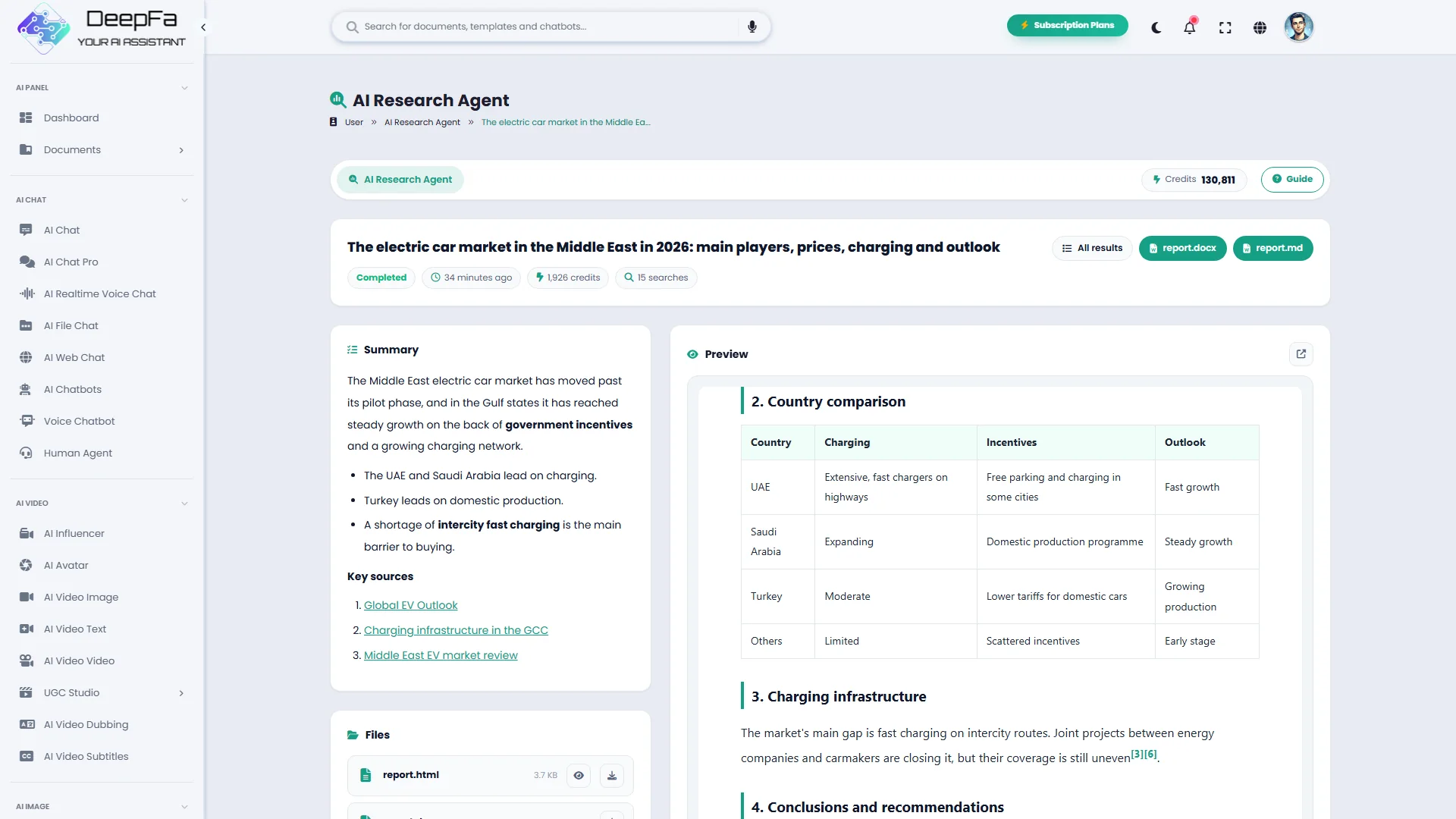
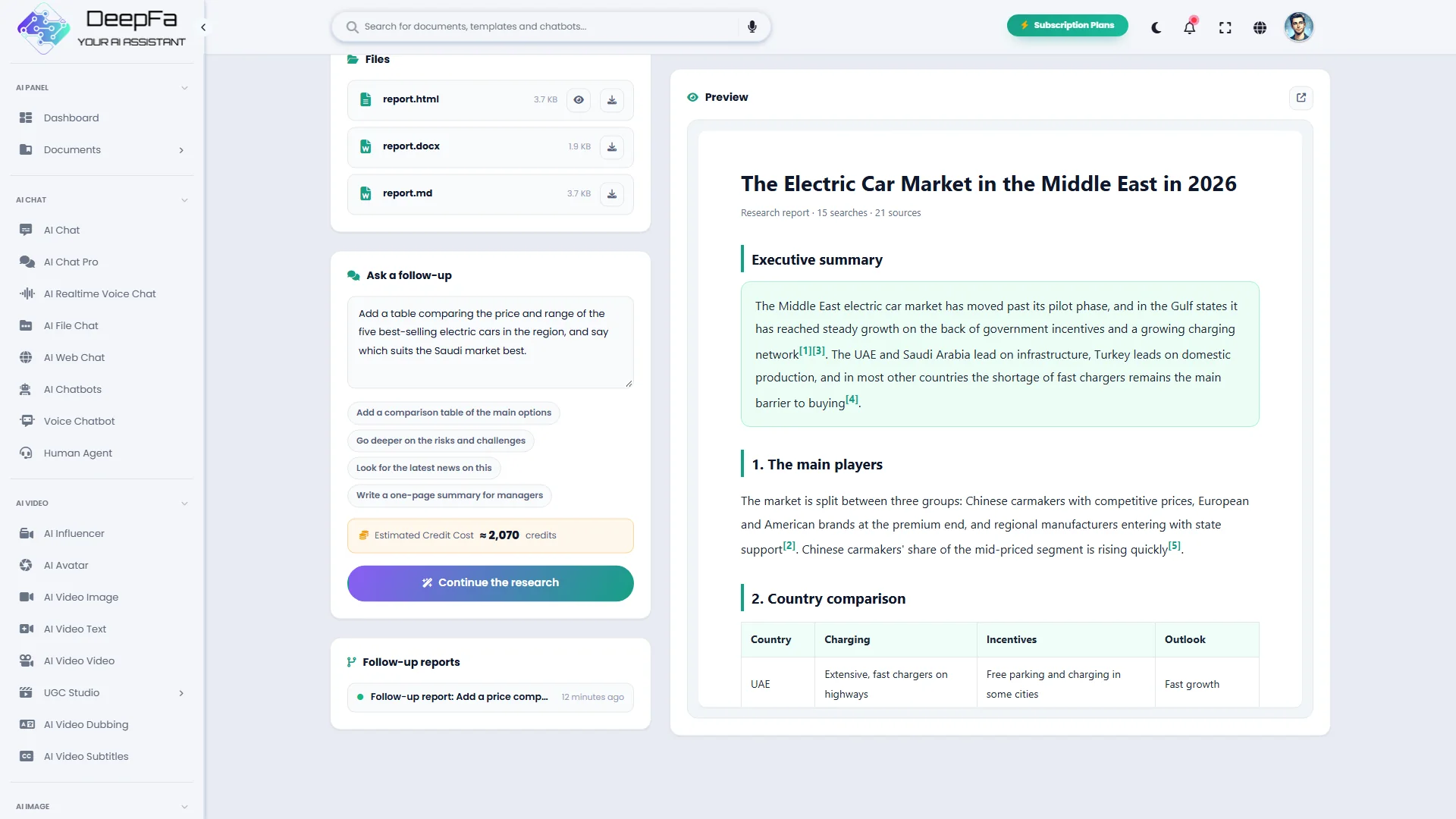
The output is a structured report: a title, an executive summary, the findings in headed sections with comparison tables, conclusions and recommendations, and a numbered list of sources with their titles and full addresses. Every claim in the text points to its source number, so you know where each figure came from.
You receive the report in three forms: a printable web page that opens beside the result, a Word document with real headings and tables (right-to-left for Persian) and a Markdown copy. You choose the research depth — quick, standard or deep — and get the report in Persian or more than 20 other languages.
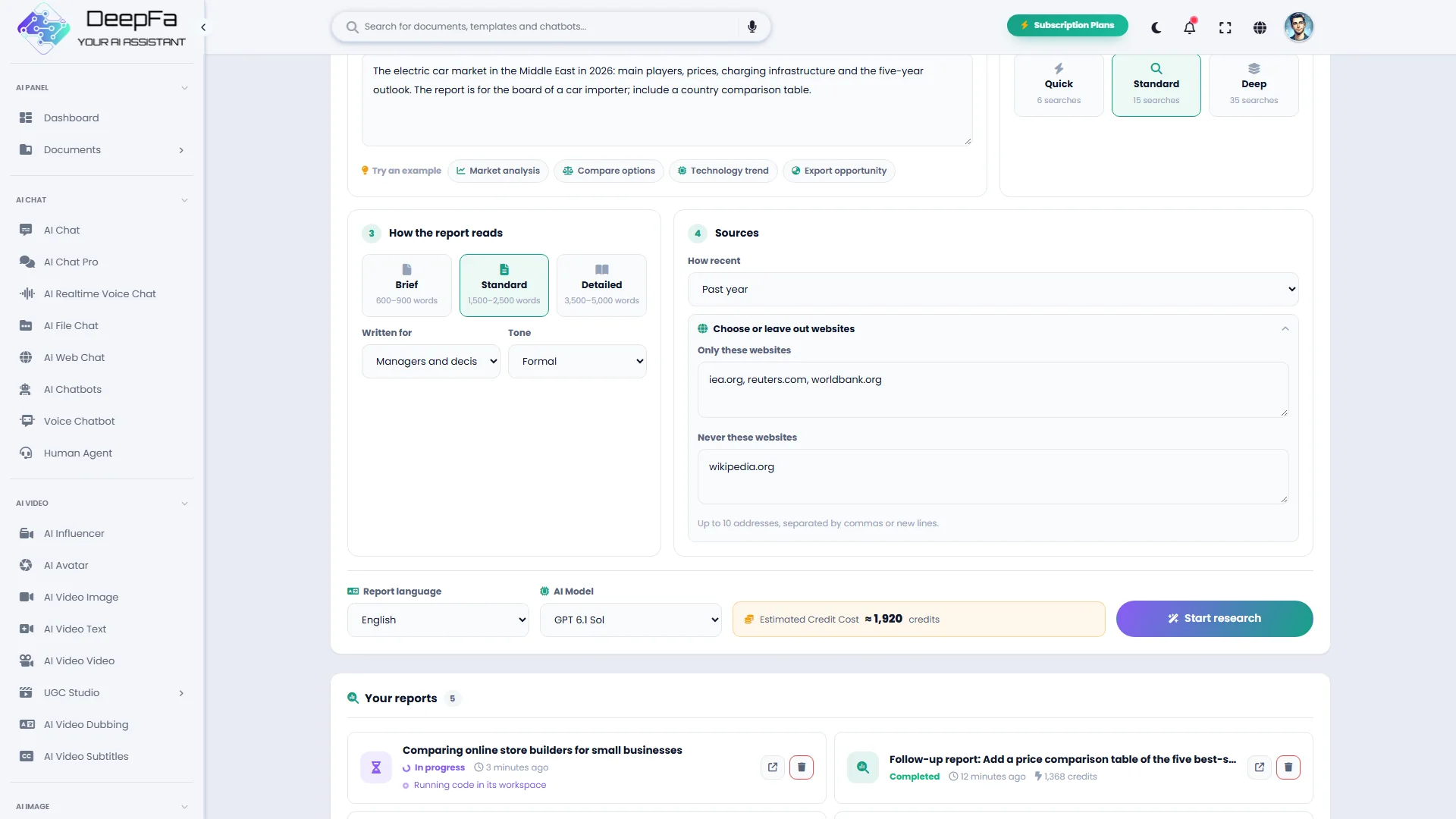
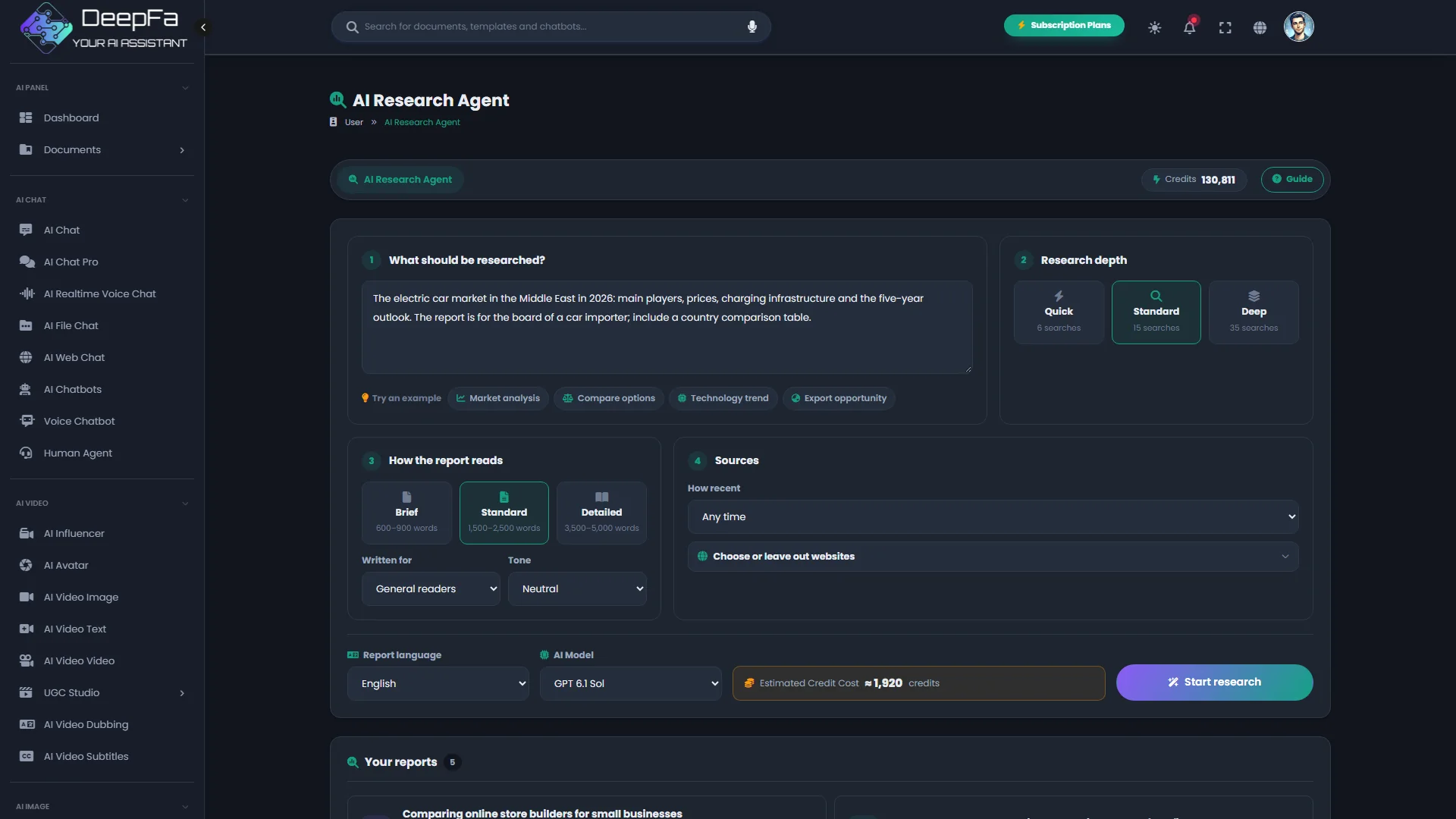
You order the report the way you need it: brief, standard or detailed; for general readers, managers, specialists or students; in a formal, neutral or friendly tone. The sources are yours to set too: only from the past week, month or year, only the websites you name, or everything except the ones you leave out.
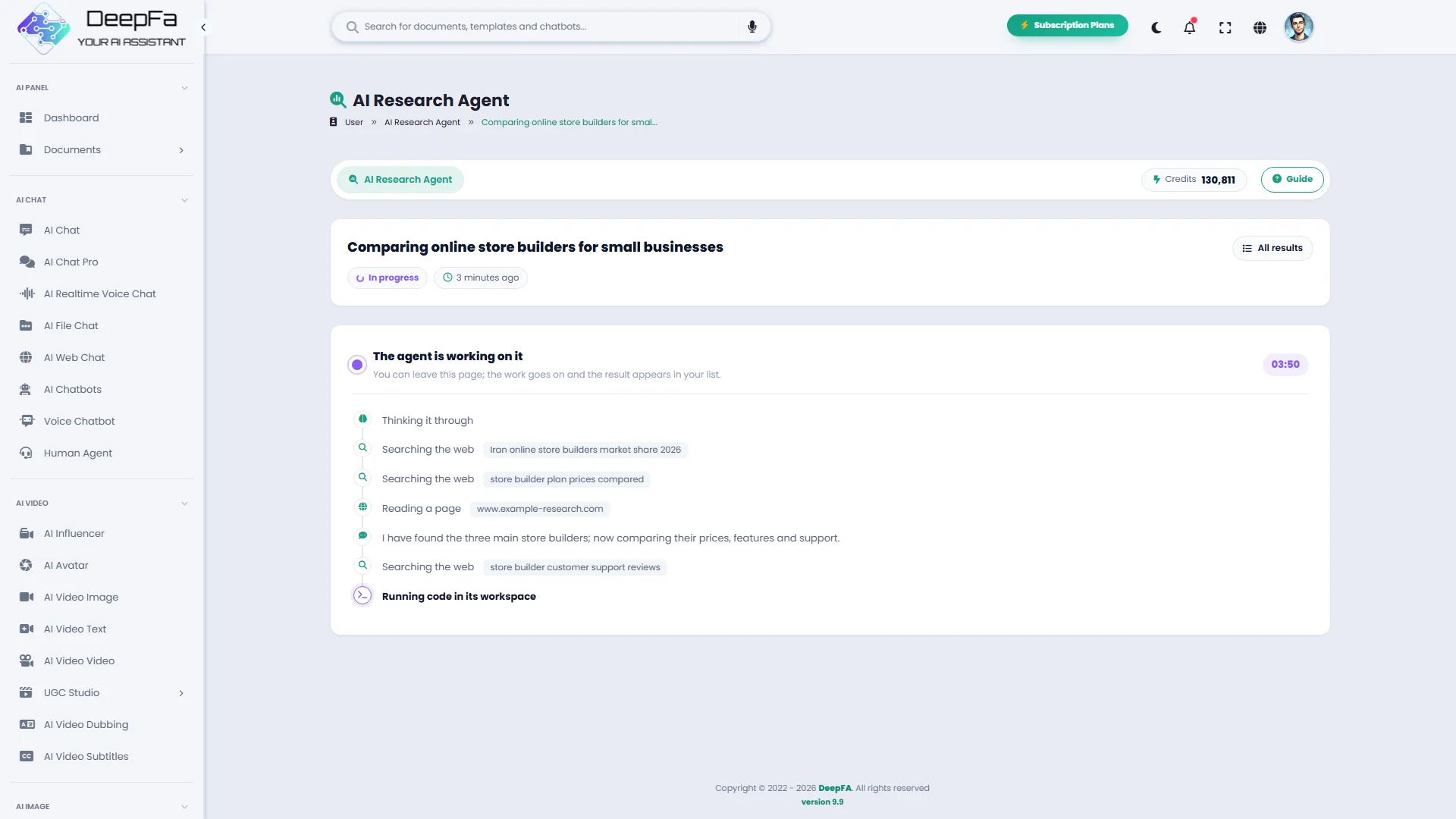
While it works you watch the agent's steps live: each search with what it searched for, the pages it reads and the files as they become ready. When the report is done, just write your next question — "add a comparison table" or "go deeper on the risks" — and the agent reads the earlier report and continues it or rewrites it.
If you are looking for an AI research assistant, a market research tool, competitor analysis or fast sourced report writing, DeepFA's research agent does hours of searching and note-taking in minutes — and you pay only for what each run actually used.
A report you can hand to someone
Every run has four outputs — from the summary you read on the page to the file you send to a manager or a client.
Executive summary
The gist of the findings on the result page, with the five key sources as links.
Web report
The full report with headings, tables and numbered sources, opened beside the page and ready to print.
Word document
The same report with real headings and tables, right-to-left for Persian and ready to edit.
Numbered sources
Every claim carries its source number; the full list of titles and addresses closes the report.
Research with the agent in 5 steps
You write the question; the searching, reading, checking and writing are the agent's job.
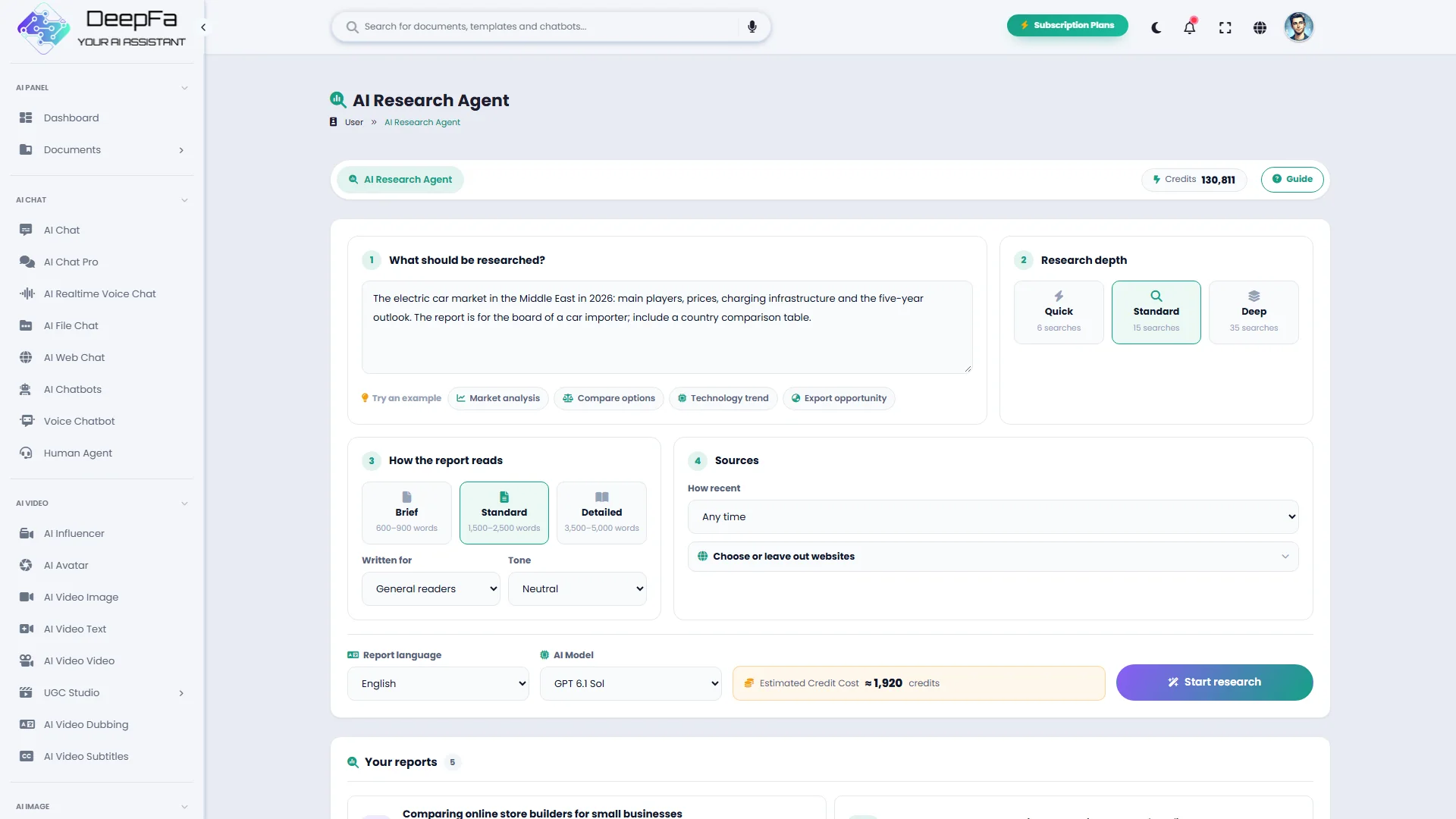
A precise question
Name the subject, the region and the period. "Electric cars in the Middle East in 2026: players, prices, charging" beats "tell me about electric cars".
Depth, shape and sources
Quick to check a fact, deep for a decision; the report's length, audience and tone; how recent the sources must be and which websites to keep to or leave out. The estimated cost is shown beside the button.
Searching and reading, live
The agent searches the web, prefers recent and reputable sources and cross-checks the important numbers; you see each search and each page as it happens.
Writing the report
The findings are written up in headed sections, tables and conclusions, each claim with its source number.
Delivering the files, and going on
The summary on the page, the full report in the preview, the Word and Markdown files ready to download — and a follow-up question to take the same report further.
Why DeepFA's Research Agent?
The difference between a sourced report and an answer from memory is in the sources and in the way the work is done.
A source for every claim
Every figure and important claim points to its numbered source; to check it, you open that source.
Pay for what the run used
The estimate is shown before you start and the charge is what that run actually used. A failed run costs nothing.
In the language you choose
Get the report in Persian or more than 20 other languages, whatever language its sources were in.
Live steps, in the background
Watch every search and every page the agent reads as it happens — or close the page; the finished report waits for you in the list.
Files ready to hand over
A printable web page, a Word file and Markdown — no copying and reformatting.
A report made to order
Three depths, three lengths, four audiences and three tones, with recent sources and the websites you choose. To go further, just write the next question.
From question to report in 4 steps
One short form and a few minutes' wait; the rest is the agent's work.
Write the question
State the subject, the region, the period and who the report is for.
Set the report and its sources
Depth, length, audience and tone; how recent the sources are and which websites; and the report language. Or try one of the ready-made examples.
Watch the agent at work
Each search, each page and each finished file shows as it happens; it usually takes a few minutes.
Open the report and go on
Read the summary, view the full report and download the files; ask a follow-up to take the same report further.
Who is the research agent for?
Anyone who needs to know before deciding and has no time for hours of searching.
Managers and decision-makers
Get a documented picture before entering a market or choosing a supplier.
Marketers
Competitor analysis, market trends and prices, with sources you can cite.
Investors
An overview of an industry, its main players and key numbers before deciding.
Students and researchers
A starting point for a study, with a list of sources to read further.
Content creators
Documented background for an article, video or newsletter without hours of searching.
Consultants
A first report for a client, ready to edit in Word.
A look inside the AI Research Agent
Click any image to enlarge.
What is a research agent, and how is it different from an AI chat?
From how it searches to how to judge its sources — everything you need to get a good report.
A research agent is an AI assistant that, instead of answering from memory, does a researcher's job: it breaks your question into precise searches, reads the results, sets aside duplicate or outdated sources and writes the findings as an orderly report with references. It takes a few minutes and runs in the background.
The quality of the report depends above all on the precision of the question. The more clearly you state the subject, the region, the period and what the report is for, the sharper the searches and the more useful the report. The research depth sets how many searches the agent makes and how hard it thinks — which is most of the cost of a run.
Research by searching, not from memory
A chat answers from what the model knows, which may be out of date. The research agent searches the web at that moment and writes from fresh sources.
Depth, length, audience and tone
Quick, standard or deep for how many searches; brief to detailed for the length; and a report written for a manager, a specialist or a general reader.
Numbered, checkable sources
Each claim carries a source number, and the full list of titles and addresses closes the report.
Recent sources, from the sites you choose
Only sources from the past week, month or year; only the websites you name; or everything except the ones you leave out.
Live steps
Each search with what it searched for, each page being read and each file as it becomes ready shows on the page as it happens.
Go on with a follow-up
On any finished report, write your next question; the agent reads the earlier report and continues it or rewrites it.
For the best result, run a quick research first to check the direction, then run the real question at standard or deep. If you are comparing options, ask for a comparison table and pick the report's audience. Instead of starting again, ask a follow-up on the same report so the agent builds on what it already did. Open the sources your decision rests on yourself — any page can be out of date or simply wrong.
Tools that complement the Research Agent
Turn the report into content, a presentation or a deeper analysis.
Frequently asked questions about the AI Research Agent
Everything you need to know about how the research agent works, what it costs and what it delivers.
Start your first research right now
Sign up and turn your question into a report with its sources