Chat with File Content Using AI
Analyze Word, PDF & CSV in Seconds
Upload your Word, PDF or CSV file and directly chat with AI about its content. Summarize long documents, extract key insights, analyze tables and data, and get accurate answers to any question about your document.
Chat with Word, PDF and CSV File Content Using Advanced AI
DeepFA's AI file chat tool lets you upload Word, PDF and CSV files and directly chat with AI about their content. No need to read entire documents or copy text. Just upload the file and ask your question: "What is this financial report summary?", "What are the key points of this contract?", "Analyze the second table data" — and AI responds based exactly on the text and data in the file. This tool is incredibly useful for lawyers, data analysts, students, researchers and executives dealing with long documents and data files.
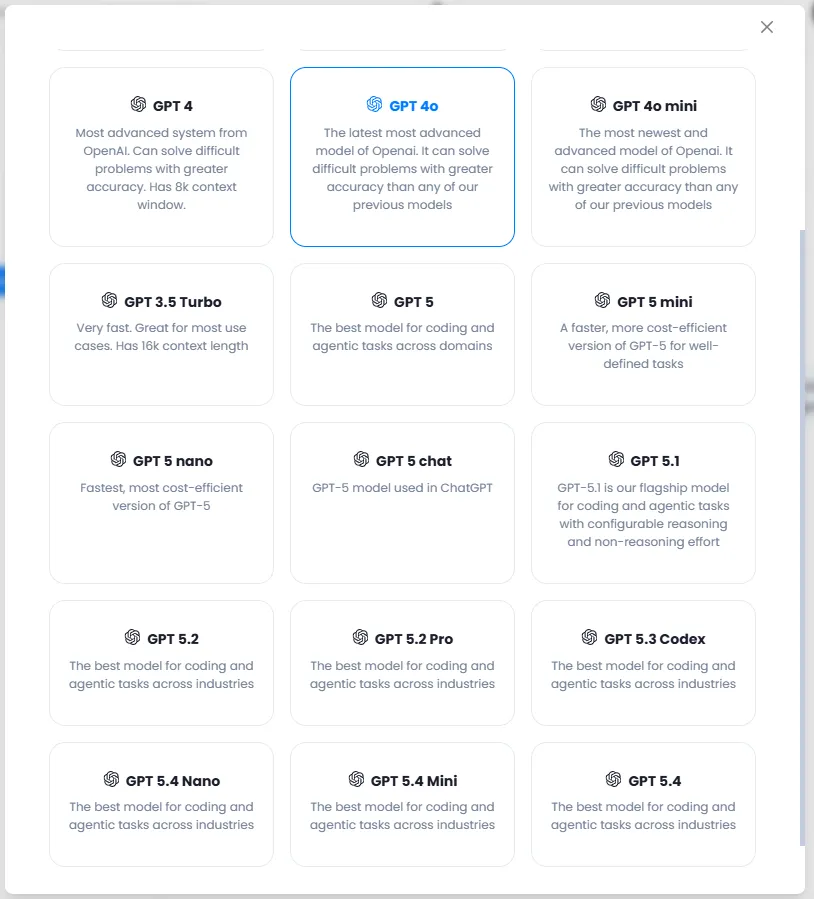
DeepFA's AI file chat supports the most advanced OpenAI model family including GPT-4o, GPT-4, GPT-3.5 Turbo, GPT-5 and lightweight mini and nano versions. You can choose the right model based on processing speed, response accuracy or cost. The brand voice feature allows you to generate summaries and responses in your brand's unique tone and style. Voice input also enables asking questions by microphone instead of typing.
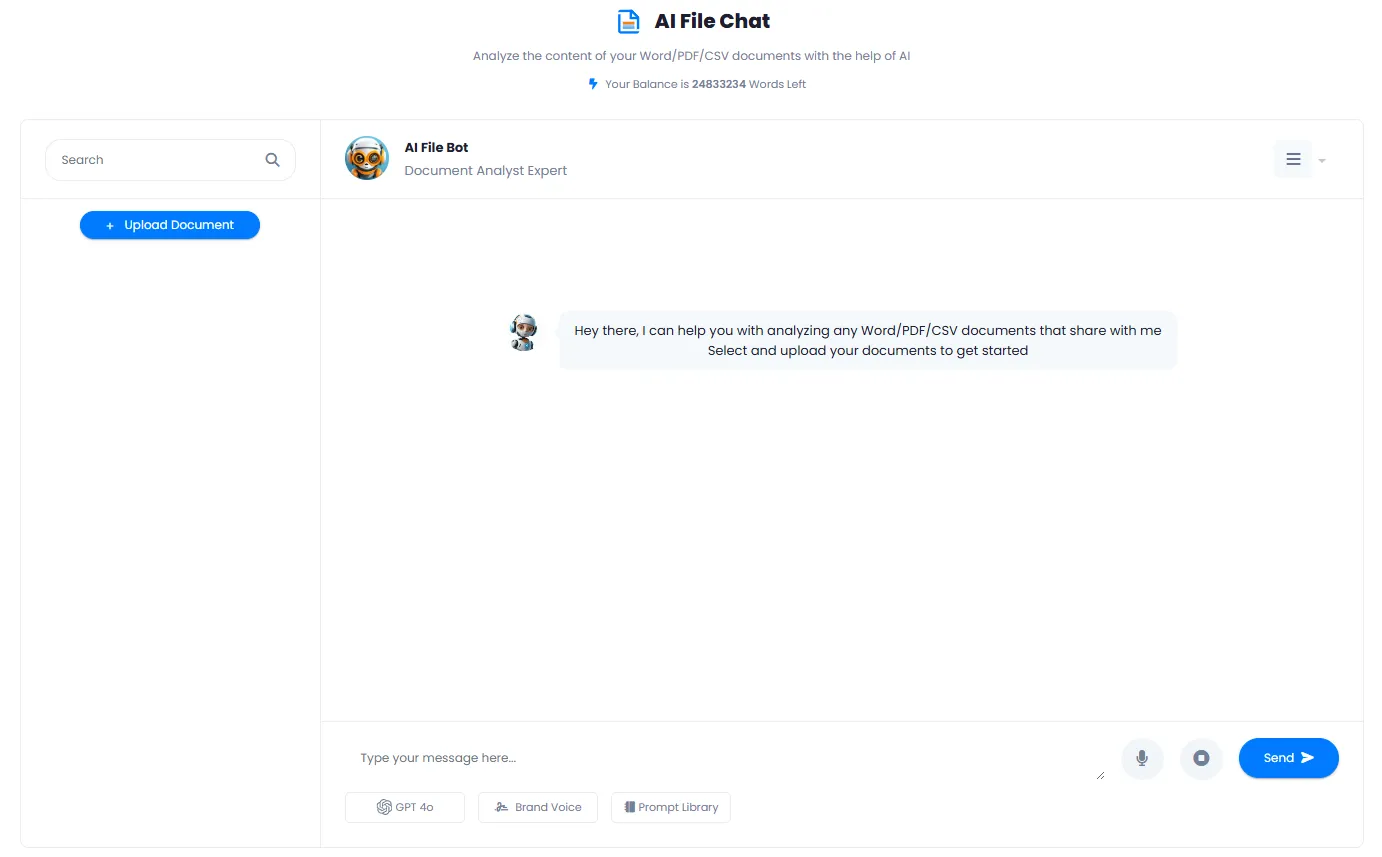
The process is very simple: upload your file, the system extracts and processes the text and data, and you can immediately start chatting with AI. Responses are provided solely based on the file content without using the model's general knowledge. Chat history is saved so you can return to previous conversations at any time.
Choose from the Best GPT Models for File Analysis
From ultra-fast to super-advanced models — pick the one that fits your needs
GPT-4o
Advanced & FastGPT-4o mini
Light & CheapGPT-4
8k ContextGPT-5
Best for CodingGPT-3.5 Turbo
Very Fasto1 mini
Reasoning & MathGPT-5 Codex
Code SpecializedGPT-5 nano
Ultra LightBenefits of File Analysis with DeepFA AI File Chat
Let AI handle your file and document analysis — save time and energy.
Upload & Instant File Analysis
Upload your Word, PDF or CSV file and immediately chat with AI about its content.
Smart Document Summarization
Get short summaries, bullet points and key insights from long and bulky documents.
Data & Table Extraction from Files
Extract and analyze structured data from CSV files or tables inside PDFs and Word docs.
Focused Q&A on Document Content
The entire conversation revolves around that file — answers are based exactly on the document text and data.
Ask with Voice Input
Instead of typing, ask your question by microphone and receive an intelligent answer.
Choose from Advanced Models
Choose from GPT-4o, GPT-5, o1 mini and others to match your specific needs.
Analyze Your File in 4 Simple Steps
From file upload to getting smart answers — fast, simple and no technical knowledge required
Upload your file
Enter the file chat page and click the upload button to select your Word, PDF or CSV file from your device.
Process and extract text
The system automatically extracts and processes the file text and data, and AI becomes ready to answer.
Ask your question
Type in the chat box: "Summarize", "Key points", "Analyze table data" and press send.
Get answer and change model (optional)
Receive the smart answer. If you need higher accuracy, click the model name and choose another like GPT-5 or o1 mini.
Who Benefits from AI File Analysis?
From lawyers and legal professionals to data analysts and students — anyone who works with files and documents
Lawyers & Legal Professionals
Analyze contracts, detect important legal clauses and extract party obligations
Data & Statistical Analysts
Get data patterns, statistical summaries and number analysis from CSV files
Students & Researchers
Summarize scientific papers, extract research results and query academic content
Executives & Decision Makers
Get financial report summaries, meeting minutes and strategic documents in a few lines
Writers & Content Creators
Extract ideas, quotes and important information from reference files and research sources
Business Consultants & Analysts
Analyze strategic documents, prepare bullet points for presentations and extract key data
A Look Inside the AI File Chat Interface
Real screenshots of file upload, AI conversation and model selection — click to enlarge
What is AI File Chat and what is it used for?
From uploading Word, PDF and CSV files to smart summarization and data extraction — everything you need to know about document analysis with AI.
DeepFA AI File Chat is a specialized tool for focused conversation with your file content. The key difference from regular chatbots is that the entire conversation revolves around the uploaded file, and AI provides answers solely based on that file's text and data — without mixing in its general knowledge. This is crucial for lawyers, data analysts, students, researchers and executives dealing with long documents, financial reports, contracts and CSV files, as it guarantees answers stay within the document scope and are fully attributable.
The tool supports three main formats: Word (DOC/DOCX), PDF and CSV. After upload, the system extracts text and tables, and AI becomes ready to answer. You can ask questions like "What is the summary of this contract?", "What are the key points of this financial report?", "Analyze the data in column three of the table", or "What is the main conclusion of this scientific paper?" You can also switch AI models among GPT-4o, GPT-5, o1 mini and others, use voice input instead of typing, and receive summaries in your brand's tone via Brand Voice.
Three main formats: Word, PDF and CSV — all professional needs covered
Word formats (DOC and DOCX) for text documents and reports, PDF for contracts and scientific papers, and CSV for tabular data and spreadsheets. AI fully understands and analyzes text, tables and structure of all three formats.
Smart summarization of long documents in a few lines
Instead of reading a 50-page document, just say "summarize". AI extracts the most important sentences, paragraphs and results as bullet points or a few concise lines. Reduce contract, report and paper review time by up to 90%.
Extract and analyze data from tables and CSV files
Have a CSV file and want to find patterns, averages or trends? Just ask "calculate the average of column three" or "which month had the highest sales?". AI also analyzes tables inside PDF and Word files.
Focused document conversation without going off-topic
Unlike general chatbots that may mix external information into answers, DeepFA File Chat AI answers solely based on the uploaded file — fully attributable and free from out-of-context errors.
Choose the AI model that fits your needs
Default model is GPT-4o. Need higher accuracy? Use GPT-5. Speed is important? Pick GPT-4o mini. For analytical and mathematical problems, o1 mini is best. All models support file analysis.
Voice input — ask questions without typing
Don't feel like typing? Just click the microphone icon and say your question. AI converts voice to text and answers. Ideal when you have many follow-up questions.
Privacy and data security — your files remain confidential
Uploaded files are used only for that conversation and are deleted after the conversation ends or upon your request. Your data is never shared with others.
For professional use of File Chat, start by uploading your file and asking general questions like "summarize" or "key points". If you need more detailed analysis, switch the model to GPT-5 or o1 mini. For large files (over 50 pages), use models with larger context windows like GPT-4. You can upload several different files in separate conversations, and each history is saved independently. You can combine analysis results with other DeepFA tools like content generation and brand voice for a more professional final output.
Tools That Pair with AI File Chat
From content creation to WordPress publishing and presentation building — more capabilities with DeepFA tools
Frequently Asked Questions About AI File Chat
Answers to your common questions about file upload, content analysis and using AI models.
Upload Your File Now and Start Chatting with AI
With free registration, analyze your first file and experience the power of AI in document analysis