Introduction
A simple question: how much time does your company spend each day on tasks that a smart assistant could handle?
Reports that need to be pulled from five different systems. Emails that need to be read, categorized, and answered. Data that needs to move from the CRM to the database. Weekly meetings that need summaries and follow-ups.
These aren't tasks that require creativity — but they consume hours of valuable time.
Model Context Protocol was built exactly for these scenarios. And the companies implementing it today — not as a technology experiment, but as a real competitive advantage — are pulling ahead of the rest.
This article is about the how — not theory, but practical MCP implementation in real organizational environments.
Why Organizations Need MCP
The Real Problem: Information Silos
Most medium and large companies share an uncomfortable reality: their systems don't talk to each other.
- CRM in one place
- ERP somewhere else
- Projects in Jira or Asana
- Communications in Slack or Teams
- Documentation in Confluence or Notion
- Financial data in a separate accounting system
Each of these systems holds valuable information. But getting a complete picture — "what's the status of this customer?" — requires an employee to visit multiple systems, gather information, and manually piece it together.
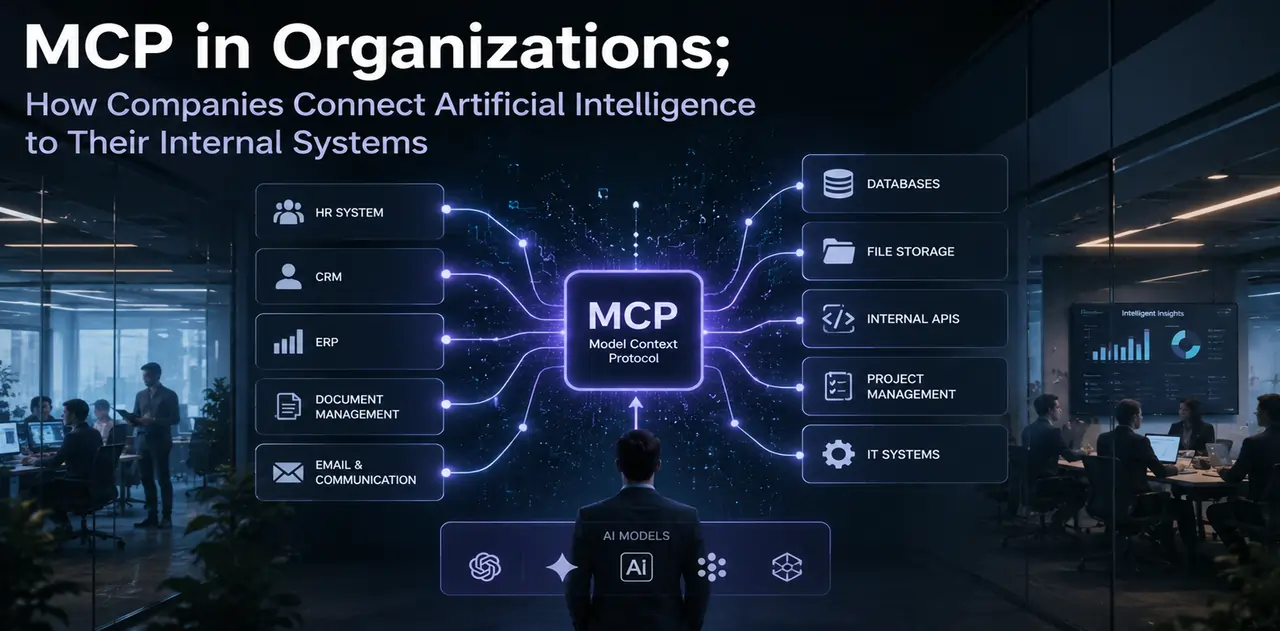
MCP bridges these silos — through a standard layer that lets AI interact with all systems through one unified interface.
Why Now?
Agentic AI has reached the point where models can autonomously handle complex, multi-step tasks. But that capability without connection to an organization's real data is only half the equation. MCP is the missing half.
Real Organizational Scenarios
Scenario 1: Sales Team — From Scattered Data to Instant Reports
The problem before MCP:
The sales manager spends 2 hours every Monday building a weekly report. They pull data from Salesforce, combine it in Excel, review emails, and go through the week's meetings.
With MCP:
An AI Agent is connected to the CRM, email, calendar, and financial system. Every Monday morning, the sales manager simply says:
"Give me last week's report. Flag any deals that haven't had follow-up in more than 30 days."
The Agent:
- Reads CRM data
- Reviews the week's emails
- Checks logged meetings with customers
- Identifies deals without follow-up
- Produces a coherent, prioritized report
Result: 2 hours becomes 5 minutes. The sales manager has more time for work that genuinely requires human judgment.
Scenario 2: Support Team — From Generic Replies to Real Help
The problem before MCP:
When a support rep gets a new ticket, they have to:
- Look up the customer's history in the CRM
- Check the order status in the order system
- Search the knowledge base for a solution
- Write the response
This process takes 10 to 15 minutes per ticket.
With MCP:
An AI Agent is connected to all these systems. When a ticket comes in:
- It instantly reads the customer's complete history
- Sees the current order status
- Finds similar past issues
- Writes a personalized, suggested response
The support rep just reviews the response, edits if needed, and sends it.
Scenario 3: HR Team — Smarter Hiring
The problem before MCP:
Reviewing resumes, scheduling interviews, sending follow-up emails — all manual and time-consuming.
With MCP:
An Agent connected to the ATS, team calendar, and email:
- Reads new resumes and matches them against role criteria
- Sends interview invitations to suitable candidates
- Finds open slots in interviewers' calendars
- Sends follow-up emails after each stage
- Maintains a live hiring status dashboard
This is where
AI in recruitment genuinely transforms the process — not just resume screening, but managing the entire pipeline.
Scenario 4: Finance Team — Automated Reconciliation
The problem before MCP:
Every month, a finance analyst manually reconciles invoice data from the accounting system against orders in the ERP. The process is tedious, time-consuming, and prone to human error.
With MCP:
An Agent connected to the accounting system, ERP, and email:
- Reads incoming invoices
- Matches them against related orders in the ERP
- Identifies discrepancies and generates a report
- Requests clarification from the relevant person for ambiguous cases
What used to take 3 days of manual work is now an automated report — with only exceptions requiring human review.
Scenario 5: Software Development Team — From Bug to Fix, Faster
The problem before MCP:
When a bug is reported, a developer has to:
- Read the Jira ticket
- Find relevant logs
- Locate the related code in GitHub
- Review recent changes
- Implement the fix
With MCP:
An Agent connected to Jira, GitHub, the logging system, and the dev environment. The developer says:
"Review bug #1427."
The Agent:
- Reads the ticket
- Finds related logs
- Reviews recent commits in relevant files
- Suggests the most likely root cause
- Writes an initial patch
The developer spends their time validating and refining — not searching and gathering.
This is the power that tools like
Claude Code give developers — and MCP is the standard infrastructure that makes these connections possible.
Enterprise MCP Architecture: How to Implement It
Layers of a Professional Enterprise MCP System
A solid enterprise MCP implementation typically consists of these layers:
Layer 1: Dedicated MCP Servers
A separate MCP Server for each internal system:
- MCP Server for CRM (only necessary access)
- MCP Server for ERP (with defined restrictions)
- MCP Server for the email system (with confirmation required for sending)
- MCP Server for the knowledge base (read-only)
Layer 2: Security Gateway
A central layer that:
- Authenticates all requests
- Maintains complete logs of all interactions
- Enforces access restrictions
- Blocks suspicious requests
Layer 3: AI Model
The model that users interact with — could be Claude, GPT-4, or a locally-hosted model.
Layer 4: User Interface
A simple chat interface that employees use.
Table: Which Organizational Systems Work with MCP?
| System Category | Common Examples | MCP Server Status | Primary Use |
| CRM | Salesforce, HubSpot | ✅ Available | Sales reports, customer tracking |
| Project Management | Jira, Asana, Linear | ✅ Available | Project status, prioritization |
| Internal Comms | Slack, Teams | ✅ Available | Conversation summaries, alerts |
| Documentation | Notion, Confluence | ✅ Available | Search, updating docs |
| Code Repositories | GitHub, GitLab | ✅ Available | Code review, PR management |
| Databases | PostgreSQL, MySQL, MongoDB | ✅ Available | Smart queries, data analysis |
| ERP | SAP, Oracle, Odoo | 🔧 Custom development needed | Operational reports, inventory |
| BI & Analytics | Tableau, Power BI | 🔧 In development | Dashboard interpretation, analysis |
| Cloud Storage | Google Drive, SharePoint | ✅ Available | File search and organization |
Real Implementation Challenges
Challenge 1: Employee Resistance
This is one of the most genuine challenges. When a team hears "AI is going to automate our work," their first thought is: "Is my job at risk?"
The reality is that MCP mostly eliminates repetitive, tedious tasks — not human roles. But that message needs to be communicated clearly. Without transparent communication, even the best technical implementation will fail against user resistance.
Lesson: change management matters as much as technology change.
Challenge 2: Dirty and Inconsistent Data
MCP can connect AI to systems — but it can't turn bad data into good data.
If your CRM is full of duplicate, incomplete, or outdated records, the AI Agent works with those same bad inputs. This is the classic principle: Garbage In, Garbage Out.
Challenge 3: Security and Regulatory Compliance
Organizations operating in sensitive sectors — financial, healthcare, legal — need to answer serious questions:
- Are the data being sent to the model subject to GDPR or local regulations?
- Is the model cloud-based or local? If cloud, where is the data processed?
- Is there a complete log of all interactions for audit purposes?
Challenge 4: Maintenance and Updates
Enterprise systems change. When a CRM gets a major update, the related MCP Server may also need updating. This is an ongoing maintenance cost that must be factored in from the start.
The Right Implementation Model: Step by Step
Many organizations make the same mistake: trying to connect everything at once.
The result? Too much complexity, unexpected problems, and a project that never reaches its goal.
The right approach: start small, scale gradually
Step 1 — Choose a high-value, low-risk use case
The best starting point is where:
- There's real pain (repetitive, time-consuming work)
- Data is relatively clean
- If something goes wrong, the damage is limited
- Results are measurable
Good example: automating the sales team's weekly reports
Step 2 — Implement with clear restrictions
Start with read-only access only. Let the Agent build reports, but not write or modify anything. This dramatically reduces risk.
Step 3 — Measure results
Before expanding, know how much time was saved, how much accuracy improved, and how satisfied employees are.
Step 4 — Gradual expansion
Based on the results of the previous phase, add new use cases. Connect one new system at a time, not all at once.
Step 5 — Add write capabilities
Once trust is established and the system has proven itself, you can allow the Agent to take actions like sending emails or updating records — but always with human confirmation.
Real ROI: What to Expect
The question every manager asks: "Is it worth the investment?"
Based on early implementations by pioneer companies, some real numbers:
Time savings:
- Sales teams: 3 to 5 fewer hours per week on reporting
- Support teams: 40 to 60% reduction in response time per ticket
- Dev teams: 2 to 3 fewer hours per day on context-switching
Quality improvements:
- Fewer human errors in data entry
- More coherent reports with up-to-date data
- More personalized responses in customer service
Cost:
- Building a custom MCP Server for one system: a few days to a few weeks of developer time
- AI model costs: depending on usage volume, from a few hundred to a few thousand dollars per month
Most medium-sized companies see return on investment within 3 to 6 months.
MCP and the Future of the Digital Organization
MCP is part of a larger transformation. In a world where AI is reshaping
banking,
insurance, and
energy, organizations that build AI connection infrastructure today will be faster than competitors to leverage new capabilities tomorrow.
When newer, more powerful models arrive — and they will — an organization that has implemented MCP only needs to swap out the model. The infrastructure connecting it to all internal systems stays the same.
Conclusion
MCP for organizations isn't a technology — it's an approach. An approach that says AI should work with an organization's real data, not in its own bubble.
Companies that start this path today — with one simple use case, careful implementation, and gradual expansion — will have a genuine competitive advantage within a year.
Those waiting for the technology to be "perfect" may find, too late, how far ahead others have gotten.
The important question isn't "whether" your organization should implement MCP. The question is "where" to start.



 LLMs & AI Agents
 LLMs & AI Agents
 LLMs & AI Agents
 LLMs & AI Agents
 LLMs & AI Agents
 LLMs & AI Agents